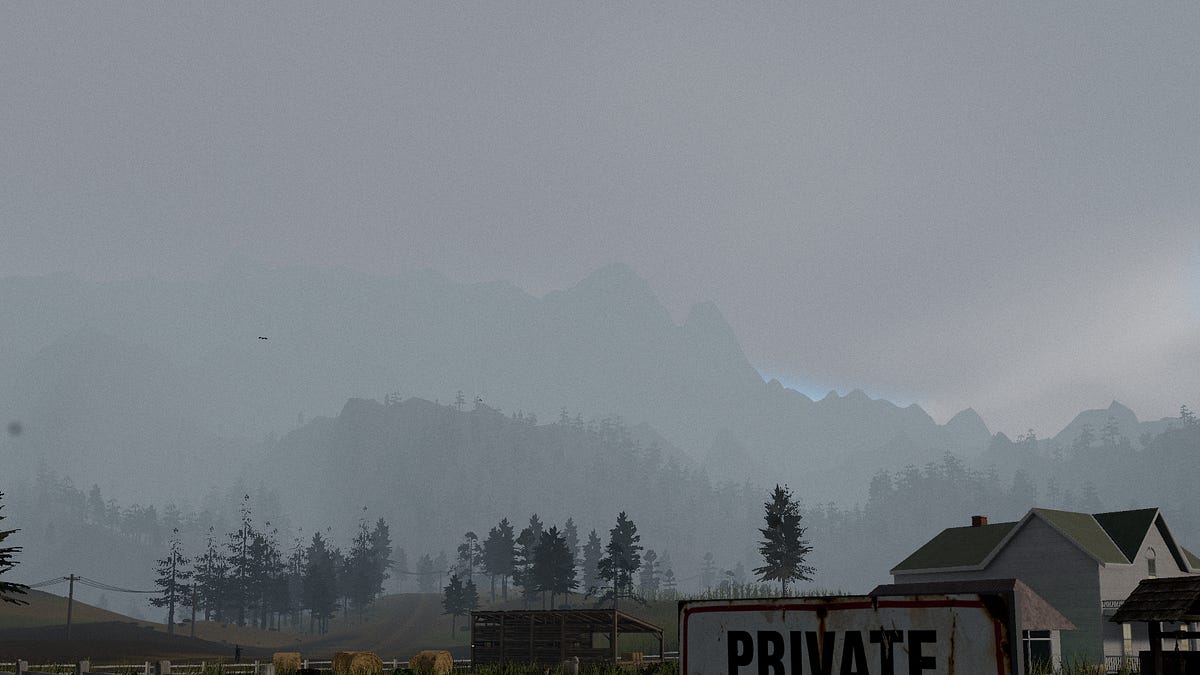
How TAKEN gets a real-looking world to hold 60fps inside a browser tab with no download, the bug that nearly sank it, and the slightly unusual way most of it got built.
I’ve not posted in a while as I’ve been extremely busy, between my day job, my consultancy work and my own pursuits and family, it’s been hard the past couple of months to find the time to write something… However, that led me to have the content to produce this article for you now and it’s a pretty cool one I think!
If you’ve been following for a while you’ll know I’ve been experimenting a lot with 3d and especially with how far I can take threejs, I’ve always had ideas for games I wanted to build but neither the time or resources to complete one, until AI came along…. So I brought one of my visions to life, it’s currently in pre-alpha, it’s called TAKEN, it’s a UFO abduction horror game set on a remote Montana farm.
You play it by opening a URL, www.taken-game.com, no need to download anything, there’s no launcher, and most importantly no 40GB install sitting on your drive. That last part is the whole story of how it got built, because everything downstream of “it runs in a browser tab” is a fight against the same wall, that is… one main thread, WebGL2, and a player whose machine you don’t get to choose.
I’ve watched an awful lot of movies and played a ton of different games, so as such there’s a lot of inspiration and even themes from the things I’ve experienced that I loved, as such, the game is going for the kind of dread you get from Nope or Signs, rural-American sky-fear, something enormous and quiet hanging over an open field at dusk.
That look only works if the world reads as an actual lived in place, big open sightlines, real terrain, weather, a sky that does something while you watch it. And all of it has to run at 60fps on whatever laptop the player happens to have open, because the moment it stutters the dread breaks and you remember you’re staring at triangles.
So this is an article about the tricks that buy you a convincing world inside a browser or any game engine tbh… the bug that took a hours to understand, and the fact that the team building it is one human and a couple of AI agents.
Let’s dig in…
On Trees… #
On the highest setting the world has just under seventeen thousand trees in it. You cannot draw seventeen thousand full tree models every frame it’s just too much for most GPU to handle. A single decent pine is a few thousand triangles, if you do the math and you’re pushing tens of millions of triangles a frame on geometry the player can barely make out, because most of those trees are hundreds of meters away.
The standard answer is LOD, level of detail, you swap the expensive model for a cheaper one as it recedes. Our cheap version is an imposter, a flat plane with a picture of the tree printed on it, baked from the model’s own side profile. Up close you get the real geometry. Far away you get a photo of a tree on a card that turns to face the camera, and at distance your eye genuinely can’t tell, so sneaky sneaky tricks, and this is something done on most games, Ghosts of Tsushima did this flawlessly…
The bit that makes it work is the seam, if you hard-swap geometry for imposter at a single distance line, you get a visible pop, the tree flickers as it crosses the threshold and the whole illusion goes cheap. So there’s an overlap band, roughly 115 to 140 meters out for trees, where a tree renders as both the full geometry and the billboard at the same time, and the billboard dither-fades in underneath the real model before the real model cuts out. The handoff is invisible.
Trees opt into this automatically by height. Anything taller than 5.5 meters gets treated as a tree and converted. Everything smaller, ferns, mushrooms, clover, flowers, opts in by hand with its own distances, because a mushroom doesn’t need a billboard at 140 meters, it’s gone from view by 40.
The other half of the trick is not doing this work every frame. Repacking which trees count as near and which count as far is expensive, so it’s throttled hard by using two species get repacked per frame, round-robin, and only if the player has actually moved more than ten meters since the last pack.
Stand still and the system does nothing at all, but if you walk across the map it quietly reshuffles a couple thousand instances behind you while you’re looking the other way. When lightning sets a tree on fire, that tree gets pulled out of the instance pool, burns for somewhere between 26 and 40 seconds, and gets swapped for a charred model, with a cap of 64 burnt trees so a long session doesn’t slowly leak memory.
The stutter that took 2 hours to understand #
There’s a class of bug in three.js that’s almost impossible to find by reading your own code, because the cause and the symptom live nowhere near each other.
The symptom was this that every so often the whole game would hitch for a single frame. Not a slow frame, a hard stop, like the engine tripped over a rug… It happened when you fired the gun, it happened when a UFO lit its beam, it happened when you picked up a battery off the ground.
Completely unrelated systems, exact same stutter.
The cause is how three.js compiles shaders, they’ve made it so that every material that responds to light has the number of lights baked into its shader at compile time, the lighting loop is literally unrolled for the exact count of lights in the scene. Add a light, remove a light, or flip a light’s .visible
flag, and the count changes, which means every lit material in the scene has to recompile its shader. Every blade of grass, every tree, the terrain, the UFO hull, all of it, regenerated mid-frame.
THERE’S YOUR PROBLEM!
And toggling .visible
is the obvious, innocent thing you reach for constantly. Muzzle flash off until you fire. Tractor beam off until the UFO hunts. It reads as free. It is the opposite of free.
The fix, once you see it, is ridiculously stupid. You create every light the game will ever need up front, at load time, before the big initial shader compile, and you never toggle them off. They stay visible forever. You drive them by intensity instead, a dormant light just sits at intensity 0, costing a rounding error per frame, and when you want it you ramp the intensity up:
// created once, at load, and left visible for the whole session
this.muzzle = new THREE.PointLight(0xfff0c0, 0, 24, 2); // intensity 0
this.camera.add(this.muzzle);

// firing: turn it on by intensity, never by .visible
this.muzzle.intensity = 10;
The light count doesn’t ever change, so nothing ever recompiles. The muzzle flash, the saucer’s glow and tractor beam, the battery pickups, all of them created eagerly and animated by intensity. We’re so careful about the count that the animal-abductor craft uses exactly one belly light where the obvious design wanted two, because a second light would have meant every lit surface in the world recompiling the instant the saucer descended.
There’s a related trick that matters just as much, a warm-up compile. After the world is built but while the screen is still up, we call compileAsync
on the whole scene, which forces three.js to generate every shader it’ll ever need before the player sees a single frame. Skip it and the first time you turn to face a kind of geometry you haven’t looked at yet, you eat a compile hitch. Do it and that cost gets paid behind the bar where nobody feels it.
Making the sky carry the mood #
A horror game set outdoors lives and dies on its sky, the entire feeling of Nope is a clear blue sky you’ve slowly started to distrust. So the sky got a disproportionate share of the attention.
The first decision was the tone mapping, that’s the curve that squashes the raw high-dynamic-range render down into something a monitor can actually show. Most games reach for the likes of ACES, the filmic curve borrowed from the movie world, etc... But with Taken I’m using AgX instead, it has a longer, softer shoulder and it crushes the toe harder, which is a wish washy way of saying the bright sky doesn’t blow out to a flat white and the shadows go properly, uncomfortably dark without turning to mud. For a game trying to make late afternoon feel wrong, that dark toe is doing real magic.
The day-night cycle runs a full 24 hours in 540 seconds, nine minutes, and it starts in the late afternoon so a new player drops straight into golden hour sliding toward dark. The moon phase is randomised per playthrough and advances over in-game days, and it isn’t decoration, a full moon is what brings out the wolf pack.
The atmosphere itself is the part I’m proudest of and also the part that’s still cooking currently as it’s what will make or break this endeavor. The shipping build uses three.js’s built-in sky, the Preetham analytic model, which is perfectly fine, it gives you a believable gradient and a sun. But it’s an approximation and it doesn’t capture why a real sunset goes red (although I’m working on a replacement that looks much much better). So there’s a parallel version being built in an isolated sandbox, a custom raymarched atmosphere that integrates the actual physics: Rayleigh scattering for the blue, Mie scattering for the haze that gathers around the sun, and the one most fake skies skip, an ozone absorption term.
Ozone is a thin layer sitting around 25km up that selectively eats blue light along long slanted paths through the air, which is a big reason the sky reddens at the horizon at sunset. It marches 24 steps through the atmosphere per pixel, plus six more toward the sun for the light contribution. It’s heavier than Preetham, so it’s being tuned in the lab before it gets ported into the game proper. The rule we hold to is that the experiments don’t ship until they’re actually better, not just different.
One game, from a potato to a 4090 #
There are five quality tiers, and they aren’t cosmetic, they’re structurally different builds of the world and measurably different.
The floor is “low”: the game renders at 42% resolution and upscales, no shadows, no bloom, no volumetric god-rays, the terrain is a coarse 128-segment mesh, and there are about 3,000 blades of grass in the entire world. The ceiling is “ridiculous”, which renders at 2x, supersampling, drawing four pixels for every one you actually see and averaging them down, with a 512-segment terrain and 320,000 grass instances. Ultra, the sane top setting, sits at native resolution with 150,000 grass and god-rays switched on, a 48-sample screen-space raymarch for the light shafts. Same game, wildly different machines.
You don’t pick the tier... On first load the game inspects your hardware, it reads the WebGL renderer string, which usually tells you whether you’re on an Apple chip, a discrete RTX or Radeon, or some integrated potato, checks your CPU core count, and guesses. Then dynamic resolution takes over and does the real work. Every frame it watches how long the recent frames took, and if it’s missing the 60fps budget it quietly drops the render scale down toward a floor that depends on the tier, then pushes it back up when there’s headroom. The world detail stays fixed while the pixel count flexes. You feel a slightly softer image for a second when things get heavy, which is a far better deal than a stutter.
There’s one more pacing detail that’s invisible until it’s wrong. The engine samples the browser’s frame timestamps to work out your display’s actual refresh rate, then locks itself to a clean divisor of it. On a 120Hz screen it’ll render a steady 60 rather than bouncing around between 95 and 110, because a stable 60 beats a jittery 100 every time.
The asset pipeline is where the days actually go #
People assume the rendering is the hard part of a game like this however, the rendering is mostly solved problems. The grind is assets, taking a 3D model you found or bought and beating it into something a browser can download and draw without choking!
Every model runs the same gauntlet, built on gltf-transform, meshoptimizer, and sharp they dedupe the vertices, weld the seams, simplify the triangle count AND recompress every texture to WebP. A photoscanned plant might show up as a 50,000-triangle, 4MB monster, and if it refuses to simplify down, which photoscans often do because the per-triangle UV seams stop the simplifier from collapsing edges, then it just doesn’t get to be in the game.
One greedy asset can tank the download for everybody.
Two gotchas cost me an evening so listen up in case you face it so you don’t go down the same rabbit hole... The first is orientation… A lot of models off Sketchfab, or anything exported through FBX, carry a rotation baked into a node sitting above the mesh, and the applies it for you. If you don’t notice and you “helpfully” rotate the vertices on top of that, the model ends up sideways. I had a whole forest of pines lying down on their sides for an embarrassingly long time before that clicked.
The second is foliage transparency, models arrive with leaves set to alpha-blend, which looks right until you have a thousand of them and they start sorting through each other and flickering like a bad TV. The fix is to convert them to alpha-test, a hard cutout where each pixel is either fully there or fully gone, no blending, which sorts correctly and plays nice with the anti-aliasing. Every leaf, every blade of grass, every fern in the game is a hard cutout for that reason.
is also where instancing gets wired up. Most of the models get merged down to a single material on load so the whole species can be drawn as one instanced mesh, and the trees that need to keep a separate trunk and canopy material get a grouped that preserves the split. It’s plumbing, but it’s the plumbing that lets you draw sixteen thousand trees in a couple of draw calls instead of sixteen thousand.
Who “we” actually is #
Here’s the part that fits this blog. “We built this” is a bit of a silly phrase but we all do it anyway right? Because the team is one human and a couple of AI agents, and the agents wrote a lot of the code… The human did conceptualisation, art direction, music direction, scene composition, and many many more things that the AI just cannot do, and the most important one is to have taste…
The whole project runs on a context substrate, the method I keep going on about. There’s a CLAUDE.md at the root of the repo that’s the working contract for any agent that touches the code. It spells out the build command, which is tsc && vite build
and not plain vite build
, because skipping the type-check lets type errors slide silently into production and that has bitten us. It names the git identity to commit as, the hard architectural rules, the asset pipeline. There’s a .context
file alongside it that orients an agent, what the game is, where everything lives, the conventions. An agent reads those before it does anything, so it doesn’t waste a session rediscovering the shape of the project.
Those rules aren’t suggestions, they’re load-bearing… One of them for example; every 3D object, and every scatter of grass or rocks, has to be toggleable from an admin panel and wired to a density slider. Sounds like bureaucracy until you realise it’s how one person debugs a world with hundreds of thousands of objects in it, you turn things off until the problem shows itself. Another: anything numerous or heavy has to ride the LOD system from earlier. Writing those down as rules means an agent building a new feature inherits them for free, instead of me catching the violation in review three days later.
The weird thing is that two different agents share the same working tree. I run Claude Code and Codex against the same checkout, which means they can step on each other’s edits. The substrate handles that too, the rule is each agent stages only the specific files it changed, by explicit path, never a blanket git add -A
, with notes about which files belong to whose experiments. It’s the same coordination problem two human engineers have on a shared branch, solved the same boring way, with conventions everyone agrees to follow.
That having been said, I developed https://github.com/andrefigueira/traffic-control/ to get over this exact problem! It’s a Go worker that integrates with claude and acts as traffic control for projects so you don’t crash into each other and can go faster!
Deployment is deliberately dull. It’s a static front-end with a sliver of backend, two Vercel serverless functions talking to a Redis store, one for the survival-time leaderboard, one for the live player count, counting sessions seen in the last 35 seconds. Push to main, Vercel builds it and deploys to the live site. The whole game is the client. The backend would fit on an index card. I still find it insane that I built this whilst working on other projects simultaneously in the evenings and weekends…
The soundscape rounds everything off #
I did spend a good amount of time one evening working on the ambience, as I built I would add audio, and I was always hyper aware that the audio is everything, it’s half the experience… So it HAD to be decent and engaging…
So I went to the Nth degree on everything there are crickets that chirp at night as well as frogs, snake sounds when appropriate, wind, stronger wind when at high altitude, footsteps, brushing leaves sounds, thunder, lightning, the list goes on, I was quite prolific… One of my hobbies is music production and sound engineering, so I had a lot of fun with this, and even recorded a talk show DJ for the radio that appears in game with Rick and Morty satirical style adverts like from the interdimensional cable, except grounded in the concept of the game of course so it makes sense.
The music was generated with AI also, I used Claude to do a deep review of my entire project then I gave it a list of games, and movies of which I really liked the theme as examples, for instance Red Dead Redemption 2, Nope, Signs… etc… then I gave explicit instructions on the genre pacing, instrumentation, etc… put it into Suno and got the results we have, and I think they sound pretty good let me know what you think!
Why it runs in a tab at all #
None of these tricks are exotic on their own. LOD, intensity-driven lights, dynamic resolution, hard-cutout foliage, they’re all known techniques any graphics engineer would recognise. What’s different is that one person could hold all of them at once, because the agents carried the parts I’d normally have to set down to focus on something else.
Claude Code, the tooling I create around it such as Mnemos & Traffic Control, the .context method create an emergent phenomena where the output from your agentic harness just gets better it’s a better symbiosis effectively…
The browser constraint is what forced the engineering to be lean, you can’t hide a bad frame behind a screen when there isn’t a screen, you can’t paper over a 4MB asset when the player is down it live before they can move. Every shortcut shows. TAKEN is heading to Steam as a proper desktop build through an Electron wrapper, and that version will look better, but it’ll always run in a tab first, because a horror game that’s one click away with nothing to install is the entire reason to put it on the web. You’re meant to be standing in that field before you’ve quite decided you wanted to be.
Now you’ve made it this far, you can watch a video of what’s in the game so far.