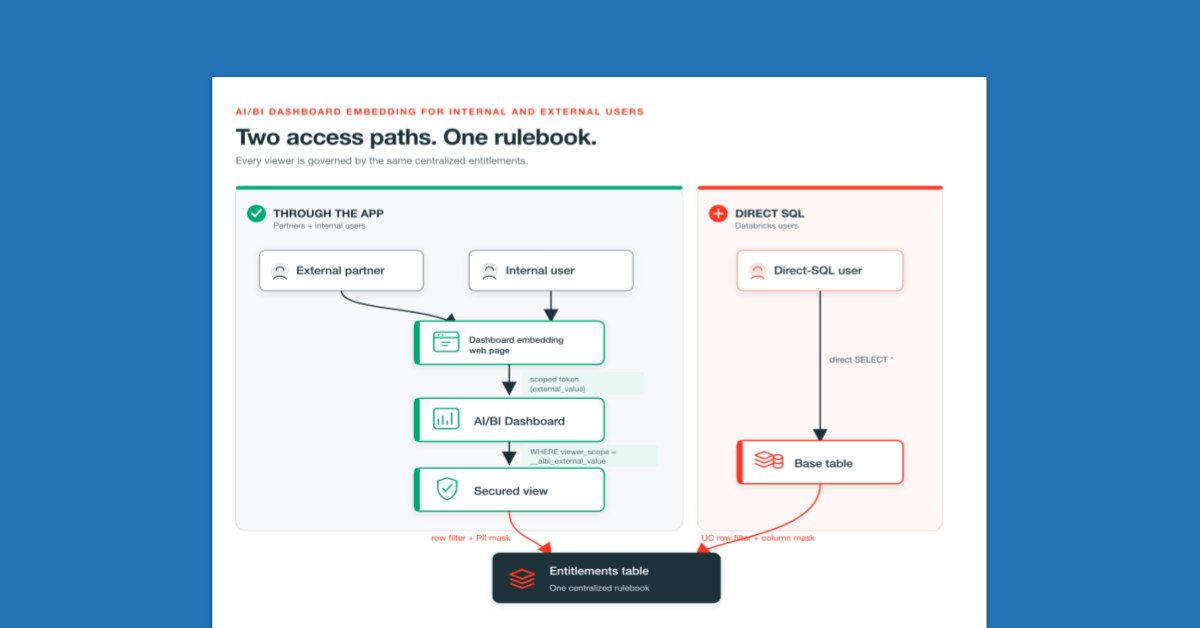
One published dashboard, per-viewer row-level security. A single entitlements table drives access, so external partners and internal teams safely share the same embedded dashboard.
Embedding a Databricks AI/BI Dashboard in a customer-facing application is relatively straightforward: enable embedding, mint a scoped token in the backend, and render the dashboard with the client SDK. The foundational guide, How to embed Databricks AI/BI Dashboards in customer-facing applications walks through that process end to end.
The harder question is authorization: once a dashboard is embedded, which rows should each viewer see? A partner should see only its own data, while an internal team may see only its region. This guide shows how to enforce those rules.
This reference pattern combines several Databricks capabilities: __aibi_external_value, Unity Catalog row filters and column masks, and groups synchronized from an identity provider (IdP). It is a design pattern, not a single feature to enable.
The same entitlements table governs two paths: embedded dashboards accessed through the application, and direct SQL queries run by Databricks users.
Consider a company that uses a shared "Open Accounts Receivable (AR) Tasks" dashboard for data across three regions: West, East, and Central. The dashboard serves two audiences.
Five viewers share one dataset, each seeing a different slice: Acme Ops, Bolt Partners, Core Logistics, Finance, and a regional operations team. The examples below focus on Acme and Finance; the identifiers partner_acme, finance_all, and West represent those examples. Acme sees West with emails masked, while Finance sees all three regions in full, both from the same published dashboard.
Access rules live in one place rather than being scattered across dashboards or queries. A dashboard per customer creates copies that can drift out of sync, while repeating filters in every query creates opportunities for mistakes.
The model consists of three objects:
| task_id | market | operating_partner | amount_open | contact_email |
|---|---|---|---|---|
| T-1001 | West | Acme Ops | $12,400 | jane@acme.com |
| T-1002 | East | Bolt Partners | $8,900 | raj@bolt.com |
| T-1003 | Central | Core Logistics | $15,200 | mia@core.com |
| viewer_scope | market | mask_pii |
|---|---|---|
| partner_acme | West | true |
| finance_all | West | false |
| finance_all | East | false |
| finance_all | Central | false |
| ops_west | West | false |
In most deployments, an upstream entitlement system or an application-owned group-to-region mapping populates this table; it is not edited by hand for each viewer.
This avoids per-customer dashboards and filters repeated across queries. The rules live in a table that can be queried, audited, and changed without modifying the dashboard.
Applied per viewer, the secured view returns only what that viewer is entitled to:
Acme (external_value = partner_acme): West only, contact email masked.
| task_id | *** market*** | *** operating_partner*** | *** amount_open*** | *** contact_email*** |
|---|---|---|---|---|
| T-1001 | West | Acme Ops | $12,400 | ****@acme.com |
Finance (external_value = finance_all): all three regions, contact email in full.
The backend sets this value when it mints the embed token. It authenticates as a service principal and requests a scoped token from Databricks with two values: external_viewer_id, which identifies the viewer for auditing, and external_value, which represents the viewer's scope. Databricks signs the token, and the viewer cannot modify the embedded value, which is exposed to the dashboard SQL as __aibi_external_value. Because it holds the service principal's credentials, this backend is a trusted server-side component, never the browser, with those credentials kept in a secrets manager rather than in source control.
The key detail is whose identity runs the query. Embedded queries execute under the configured publishing identity, not the viewer's Databricks identity.
For external embedding, Databricks recommends individual data permissions and granting the service principal its own data access, so queries run as the service principal. (Publishing with shared data permissions instead runs queries as the publisher's credentials.) The view then narrows that access for each viewer through __aibi_external_value. Because the query runs as the service principal, is_account_group_member() cannot identify the actual person viewing the dashboard on the embed path. The important detail is that external_value is not limited to a partner id. It can be any scope the backend signs into the token, for example partner_acme for an external partner or finance_all for an internal group (their group name).
Because the entitlements table holds partner ids and group names in the same column, one dashboard, one view, and one filter cover both.
Because the viewer never sees or sets the signed value, the viewer cannot change it. An unknown scope matches no rows, which provides default-deny behavior.
The same view and the same filter (WHERE viewer_scope = __aibi_external_value) serve both audiences. Only the source of that scope differs:
| Attribute | External partner | Internal team |
|---|---|---|
| Databricks login | No; accesses through the portal | Yes; signs in through the IdP |
| What sets the scope | Fixed partner ID | Entitled IdP group |
| Value signed as __aibi_external_value | partner_acme | finance_all |
| Matching entitlement | One region | One or more entitled regions |
Organizations typically manage access through groups synchronized from an identity provider. When someone joins the Finance group in Okta, their access maps to finance_all automatically, and no data table is touched. In this example, finance_all maps to every region and ops_west maps to the West region.
How does the application learn which groups belong to the viewer? It cannot rely on SQL during embedding, because the query runs as the service principal and is_account_group_member() would check the wrong identity. The application must resolve the viewer's groups in the backend, which can see the viewer, before minting the token.
One option is to run the application on Databricks Apps with user authorization enabled.
For a logged-in internal user, the platform forwards trusted identity context to the backend, including the viewer's email and an on-behalf-of (OBO) token. The backend uses that token to call SCIM /Me as the viewer and read their groups. This approach does not require administrator rights on the service principal, because the user is reading their own record. It does require user-authorization scopes, and Apps OBO is still maturing, so validate it against the target deployment before relying on it.
If no entitled group is found, fail closed and refuse to mint a token rather than fall back to a broader identity such as the raw email.

If a viewer belongs to multiple entitled groups, resolve the result deterministically. Define a precedence order, or map several groups to one canonical scope before minting the token, so the same viewer always receives consistent access.
External partners are simpler. With no Databricks identity, their scope is a fixed partner id assigned at login. Same token, same filter, no lookup.
One limitation to design around: a signed token carries a single external_value. If a viewer belongs to several groups with different entitlements, one token can still represent only one scope. For the common one-role-per-person case, that is fine.
For a true multi-group union, use an all-access group or the direct SQL path below, where a row filter can OR across every group. A composite scope (such as JSON) can be packed into external_value, but then the parsing and matching move into the dataset SQL and remain bound by the 1 KB payload limit. Row filtering delivers the base behavior: each viewer sees only their rows. Three additional layers strengthen the controls, and all three read from the same entitlements table.
Row-level security determines which rows a viewer can access. Masking determines which columns they can see, because external partners usually do not need the same level of detail as internal teams.
The mask_pii flag, true for partners and false for internal groups, drives the masking logic in the secured view (the CASE expression in the SQL above). The same dashboard can show an internal viewer the full email while showing a partner a masked value such as ****@example.com. When masking rules span many tables and grow complex, Unity Catalog column masks and attribute-based access control (ABAC) are the better long-term home; here the view keeps the example self-contained.
An unknown scope should return no dashboard rows and should not reveal anything about the underlying data structure: no error that hints at structure, no partial data, just an empty result. Stopping earlier is cleaner still: before the backend mints a token, it checks the entitlements table and refuses any scope entitled to zero rows. Just as important, the scope is derived from the authenticated viewer, never from a client-supplied parameter, so a viewer cannot request another tenant's scope.
Gating at token issuance prevents a denied viewer from ever receiving a token, which beats relying on the SQL filter as the only guard. Logging both successful token issuance and denied requests makes authorization decisions auditable: the denied viewer simply never appears, and even if a request slipped through, an unknown scope would still return no dashboard rows. Recording the external_viewer_id and its scope in those logs lets each authorization decision be traced back to a real customer or user during an audit.
The embed controls protect the application path. A Databricks user who queries the base table directly is a separate threat. Add a Unity Catalog row filter to the base table, keyed to the querying user's identity and groups. In this direct-query path, is_account_group_member() evaluates the actual user and can combine all of their entitled groups. The publisher exception in the function below (current_user() equal to the publishing identity) is a deliberate break-glass allowance for the identity that publishes or refreshes the dashboard, not a general operator bypass. It is optional and high-risk, so include it only where justified and approve it per deployment.
A column mask for sensitive fields works the same way. These Unity Catalog controls are separate from the embed path: embedded viewers are scoped through __aibi_external_value and the entitlements view, while direct workspace queries are protected by the Unity Catalog row filter, which evaluates the caller's identity and groups. Both enforcement points use the same entitlements table.
On "multi-tenancy." This is pooled, logical multi-tenancy: external partners are isolated from one another, while internal employees receive group-based (role-based) access within the company's own tenant. All data remains in shared tables; the token, the view filter, and the entitlements table enforce separation. The direct-SQL row filter extends the same guarantee outside the app.
When to use this pattern. Use this pattern when external partners without Databricks accounts and internal employees need to share one dashboard. If every viewer is an internal Databricks user, basic embedding with Unity Catalog row and column security may be sufficient.
Practical constraints and gotchas. Verify the following product limits and operational details against the current documentation before publication:
Start with the foundational guide, How to embed Databricks AI/BI Dashboards in customer-facing applications, then apply the entitlement, masking, and default-deny patterns described in this post. For the underlying governance controls, see the AI/BI embedding docs plus Unity Catalog row filters and column masks and ABAC guidance.
Subscribe to our blog and get the latest posts delivered to your inbox.