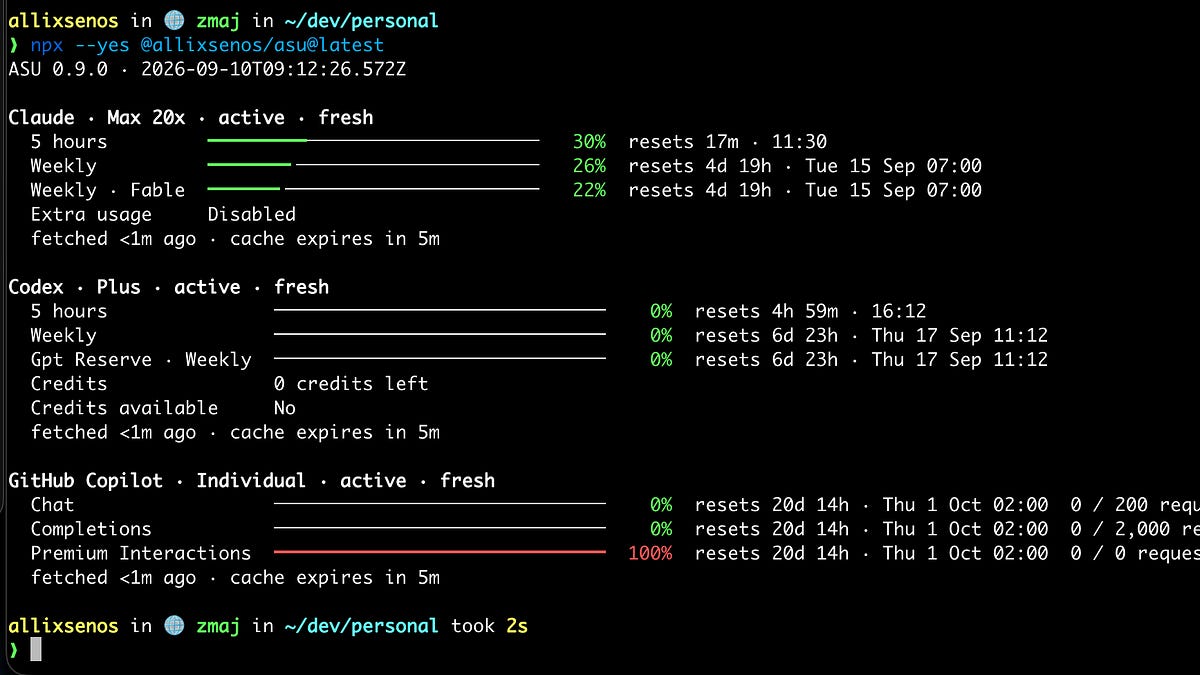
I pay for Claude Code, Codex, and GitHub Copilot. Each one meters me in its own way, and none of them meters me in a unit I can reason about.
Claude has a five-hour window, a weekly window, and a separate weekly window for Fable. Codex has a five-hour window, a weekly window, and a credits balance. Copilot counts requests per month, in three buckets. Different shapes, same output: a percentage. You have used 26 percent of this week. That number decides whether my afternoon batch runs or stalls.
Tokens don’t convert to that percentage. Not for any of them. You can count tokens from the local logs all day, and ccusage does exactly that very well. A token count tells you what you spent, but it does not tell you how much runway is left. The provider enforces the percentage, so the percentage is the truth. Anthropic has also experimented with peak and off-peak windows where the same work costs a different share of your limit depending on the hour. Good luck deriving that from a token count.
So the question I actually have, several times a week, is boring: how many more runs fit before the reset?
Where the meter lives #
Every provider shows the number somewhere. Claude Code has /usage. Codex has a command too. Copilot has a settings page. All three assume a human with a terminal or a browser open, and all three are per provider. When I want the full picture, I open three things and do arithmetic in my head.
The agent has it worse. It has no meter at all. Claude Code is halfway through a batch, the weekly window hits 100 percent, and the agent finds out the same way I do: by getting refused. It cannot plan around a limit it cannot read.
That’s the itch. The provider’s own client reads a usage endpoint with credentials that are already on disk. Nothing stops a small CLI from reading the same endpoint and printing the result in a shape both a human and an agent can use.
ASU #
ASU stands for agent subscription usage. One command, no install:
npx --yes @allixsenos/asu@latest
It finds the credentials the provider’s CLI already stored, calls each provider’s usage endpoint concurrently, and prints one bar per window. Green under 70 percent, yellow from 70, red from 90, reset countdown after each bar. Pass --json and the same data comes out as versioned JSON for scripts and agents.
Claude, Codex, and Copilot are validated against live accounts. Cursor, Z.ai, Grok, Kimi, and MiniMax have adapters that pass fixture tests and are waiting for someone with an account to confirm them. A provider that fails does not hide the others.
The agent reads its own meter #
The part I actually built this for is the bundled skill. It wraps ASU in a small script: snapshot, run a command, snapshot again, report the delta in percentage points per window, append it to a ledger. After a handful of runs you know what your heavy processing costs in the only unit the provider cares about, and how many more of them fit before Tuesday.
What it does not do #
ASU reads credentials and never writes them. It never signs in, never refreshes a token, never touches the credential store. Every request goes over HTTPS to a fixed provider host, and it refuses redirects. There is no telemetry, and there never will be. The once-a-day update check asks npm for the newest version number and sends nothing else. Publishing to npm happens only from GitHub Actions through npm’s trusted publisher, with provenance, so there is no long-lived publish token sitting anywhere to leak.
The usage endpoints are not documented, and they will change and break. Each adapter is one file. A broken provider is a one-file fix, and a new provider is one file more.
Run it once. If the bars say something different from what you assumed, that gap is the reason it exists. If you run a provider I haven’t validated, tell me what it says.
Issues and PRs welcome.
References #
- allixsenos/asu — the repo, README with real account output, security policy
- @allixsenos/asu on npm — the package the one-liner runs
- ryoppippi/ccusage — token-count tool from local JSONL logs, the “what did I spend” counterpart
- Models, usage, and limits in Claude Code — official description of the 5-hour and weekly windows and
/usage - Claude is limiting usage more aggressively during peak hours — the peak-hour experiment, later reversed in May 2026
- Claude doubled usage limits for two weeks, off-peak only — the March 2026 off-peak promotion
- Claude Code rate limits and usage quotas explained — third-party summary of the limit structure and the May 2026 doubling