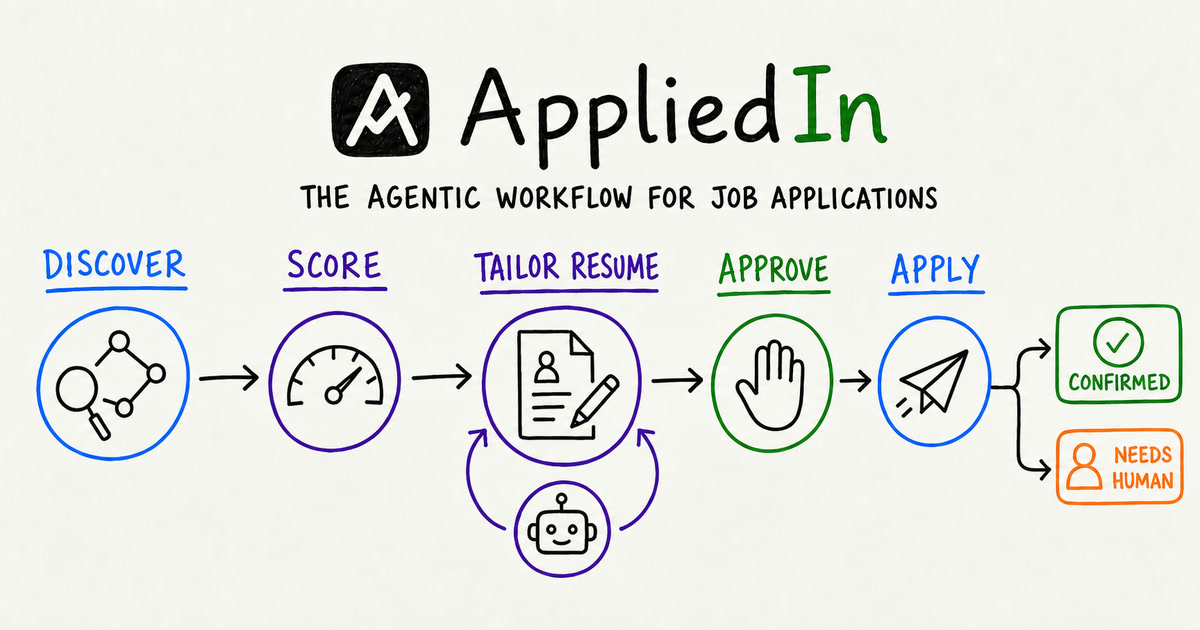
You decide where the graph s. Use gated mode to approve each application, or allow strong matches to continue. Missing facts, logins, and uncertain outcomes still return to you.
Each step has a clear owner #
AppliedIn assigns each part of an application to the actor best suited for it. Code handles repeatable rules. Focused agents handle judgment and changing websites. You control identity, missing facts, and submission.
From job discovery to verified application
Every job follows explicit states. Tools discover and filter it, focused agents score and tailor it, optional review gates can it, and the browser agent verifies the final outcome.
Agentic patterns behind the workflow #
Sequential orchestration
Explicit stages keep the business process inspectable and make recovery possible when a long-running step fails.
Structured output
The scorer returns a typed 0–10 MatchScore instead of prose that downstream code has to interpret.
Review and critique
The tailor writes, tools validate, and the critic gets no more than two passes to request one focused revision.
Human-in-the-loop
Approval, unknown facts, logins, and CAPTCHAs the workflow and return control to the owner.
Tool routing
Structured feeds handle known job boards. Browser-capable discovery is used only when the deterministic path cannot resolve a page.
Bounded browser autonomy
The browser observes, acts, and verifies, but cannot invent missing answers or retry an uncertain submission blindly.
See every job move through the graph #
Jobs move through explicit states on a local board. A role can be found, tailored, waiting for you, submitting, applied, failed, or uncertain.
From one job URL to a completed application #
01
Find and score
Reads the boards you follow, removes obvious mismatches, deduplicates roles, and stops low scores before expensive work begins.
02
Tailor and validate
Rewords existing resume content toward the role while code preserves every bullet and anchored fact and produces a valid PDF.
03
Approve and apply
Shows what changed, waits for approval, fills the employer form from approved facts, and verifies the final confirmation.
Tailor the resume without changing the facts
The tailor can adapt wording and emphasis for a role. Validation keeps every source fact anchored, produces a real PDF, and limits the critic to one focused revision across no more than two passes.
Choose where the workflow s #
In gated mode, you review the tailored resume before the browser acts. In automatic mode, strong matches can continue without that . Missing information, logins, CAPTCHAs, and uncertain outcomes always return to you instead of becoming invented answers.
The same boundaries stay visible on the product board.
What runs locally, and what requires an account #
The workflow and application history stay on your machine. Core graph reasoning uses your OpenAI key. Automatic form submission uses Claude Code and its Chrome integration in the browser session you control.
Core graph
your OpenAI key
Form submission
your Claude subscription
Files and history
your local machine
Safety rules the model cannot bypass #
A boundary written only in a prompt is a boundary nobody is enforcing. These rules also live at the tool and state layers.
Truthful resume
Every bullet and anchored fact is checked before a tailored copy is saved.
No duplicate application
A job already marked applied or applied manually is refused before submission.
No invented answer
An unknown required field becomes a human question instead of a guess.
No unproven success
Without positive confirmation, the result is uncertain—not applied.
Run AppliedIn locally #
git clone https://github.com/sayantan94/AppliedIn.git
cd AppliedIn
cp .env.example .env
./appliedin setup
./appliedin start        → http://localhost:8787/
Put the OpenAI API key in .env
, add your self-contained
LaTeX resume at resume/base.tex
, and start with one job URL.
What you need
| For | You need |
|---|---|
| Discovery, scoring, and resume tailoring | macOS or Linux, Python 3.12, Redis, LaTeX, and an OpenAI API key |
| Automatic application submission | |
| Everything above, plus Chrome or Edge, | |
Before you enable automatic submission #
Applications go out under your name. Review the resume, answers, and employer terms before submission.
- AppliedIn does not solve CAPTCHAs.
- An employer may prohibit automated applications.
- Generated text can still be wrong; inspect it before approving.