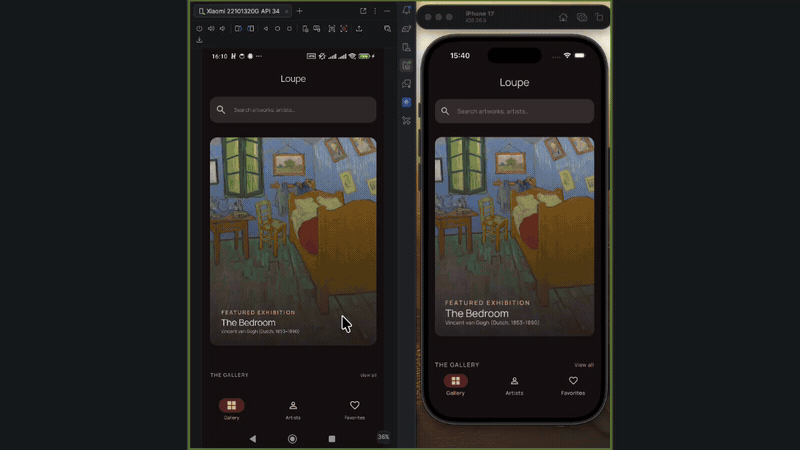
Two features, two platforms, one Kotlin Multiplatform codebase. You need Claude Code and a template that keeps the architecture from drifting.
This post is the whole build with nothing cut from the record: Loupe, an art gallery for the Art Institute of Chicago’s public-domain collection. Every prompt I typed is in this post, and every timing counts active work only.
The commands come from KMPilot, an MIT-licensed template that turns Claude Code into a design-first Kotlin Multiplatform pipeline.
The first articlecovered WHY it exists (AI-generated code drifts unless something holds its structure in place between prompts). This one is the HOW, and you can reproduce it end to end. Your job is to describe each feature, steer at the checkpoints, and approve. The same pipeline built
Kickoff26 The full session, sped up and chaptered by command. Watch the whole thing here, or read on and jump to any phase from its section link below.
What we’re building #
Three tabs, all backed by the Art Institute of Chicago’s API. Gallery browses and searches the museum’s artworks and opens a full-bleed detail screen. Artists browses artists and their works. Favorites stays an empty placeholder for the whole walkthrough and becomes your exercise at the end.
Setup: one command, one MCP server #
Prerequisites: Claude Code, JDK 21+, python3 on PATH (the design step uses it for token extraction). Then install the template:
curl -fsSL https://github.com/ThisIsSadeghi/KMPilot/releases/download/v0.1.3/install.sh | bash
The installer prompts you for two values: the app name and the package prefix. I answered
and Loupe
they're just my values, use your own and every command below behaves the same.com.yourname.loupe,
Then open the project in Claude Code:
cd Loupe && claude
You get a complete Kotlin Multiplatform skeleton: Gradle wiring, shared UI via Compose Multiplatform, a design-system module, the seven commands, the hooks, the agent definitions. It’s a clone and a rename, so it finishes in seconds.
This walkthrough is pinned to v0.1.3 so that what you read is what you run; the wiki is the living version. KMPilot writes the code; to build and run what it writes you use the usual Kotlin Multiplatform tooling, Android Studio for the Android target and a Mac with Xcode for iOS.
One piece of one-time setup:
drives /design-uiGoogle Stitch, Google's AI design tool, through its MCP server. Get an API key from stitch.withgoogle.com/settings (sign in, find the API keys section, click Create API key), then register the server at user scope so every project sees it:
claude mcp add stitch --transport http https://stitch.googleapis.com/mcp \  --header "X-Goog-Api-Key: YOUR_API_KEY" -s user
claude mcp list   # → stitch: … ✔ Connected
Two field notes. The key must come from Stitch’s own settings page: keys created at aistudio.google.com look identical but the Stitch API rejects them. And the Stitch server has rough days; if claude mcp list shows connection or schema errors, it’s almost certainly their side rather than your config. Retry later before debugging your setup.
The pipeline: seven commands, no step eight #
Each command gets a section below, shown on the real feature it built, with its real timing. There is no step eight where you fix everything by hand; a hook blocks direct edits to feature code, so changes only ever land through the pipeline.
The pipeline runs twice, and in a different order each time. On gallery
, the design comes first: /design-ui
, then /create-feature
builds against that design. On artists
, the code comes first and the design is bolted on afterwards. Two orders, same rails, and the second run shows what the rails actually save.
One thing between every command: /clear #
Every command tells you to run /clear
before the next one. KMPilot is resume-aware: its memory lives on disk, not in the context window, so you clear the whole conversation between steps and lose nothing.
Round 1: gallery, design first #
/design-ui gallery (33:02) #
You run /design-ui <feature>
followed by a plain-language brief of the screens. The build starts in a design tool. Verbatim, typos and all:
/design-ui gallery with the following details:An art gallery browser for the Art Institute of Chicago's public-domain collection.Screen 1 - Gallery: an editorial grid of artwork images with title and artist,a search bar, the feel of a modern museum app. The app has a bottom navigationbar with three tabs - Gallery, Artists, Favorites - with Gallery selected.Screen 2 - Artwork detail: full-bleed hero image, title, artist, date, medium,credit line. A quiet, gallery-like aesthetic that keeps all focus on the art.make both look premium and professional
The skill drives Stitch over MCP and brings the mockups back into the session, where you refine them by describing changes, the way you’d brief a designer. It does not silently make design decisions for you; the ones that shape the whole app, it stops and asks. Early on it proposed a brand color, offering two neutral options tuned for a gallery look. I passed on both and typed my own hex:
It also asked which optional states to design rather than assuming. I asked for all three: , Empty, and Failed, so every feature opting in later inherits the shared and Failed screens for free.
Not every change went through the prompt. Stitch has a known bug where a generation call times out with a connection reset even though the screen finished server-side; it’s reported and confirmed on Google’s AI developer forum, and marked fixed since, though it still comes and goes. The skill has a defined path for it, and rather than retry (a retry would duplicate the screen) it stops and asks me to open the project in the browser to sync.
The edit path over MCP was misbehaving in the same way, so for one change on the Artwork Detail screen I stopped fighting it and edited the screen directly in the Stitch web editor instead. I adjusted it there by hand, then told the skill to use the version already sitting in the project rather than regenerate it. It picked up the hand-edited screen, extracted its tokens, and carried on.
When a screen is right, you approve it, and approval triggers the step plain Claude Code has no equivalent for. The skill pulls the finished screens back from Stitch, extracts every color, radius, font, and spacing value out of the design itself, downloads the exact icons and images the mockup uses, and writes all of it into a blueprint: the design captured as explicit Compose instructions, stored under .claude/docs/gallery/
. It also runs a color audit and flags where the theme in code has drifted from what Stitch actually rendered, so the build step can correct it up front.
▶ Watch this phase in the full session
/create-feature gallery (58:41) #
You run /create-feature <feature>
plus the data contract (endpoints, fields, behavior). The biggest command of the seven. The design already exists in the blueprint (the skill auto-detects it and enters design-aware mode), so what you hand over is the other half of a feature: the data contract.
/create-feature gallery with the following detail:browse public-domain artworks from the Art Instituteof Chicago API. Search endpoint:https://api.artic.edu/api/v1/artworks/search?query[term][is_public_domain]=true&fields=id,title,artist_display,image_id,date_display(no auth; send a User-Agent header). Gallery grid with search; tapping an artworkopens a detail screen with hero image via IIIF(https://www.artic.edu/iiif/2/{image_id}/full/843,/0/default.jpg), plusmedium_display and credit_line. Implement the bottom navigation as designed inthe blueprint - Artists and Favorites tabs are placeholder screens for now.
Plain Claude Code would start writing files here. KMPilot stops twice first.
Checkpoint one: the PRD. A few minutes in, a short product requirements document was on screen (what the feature does, its screens, its data, its edge cases) with a waiting prompt. This is where steering is nearly free. My only intervention was one correction: I pointed out that the project keeps its base URL in composeApp/build.gradle.kts
, so the data layer should read it from there rather than hardcode its own. The skill folded that into the PRD as an explicit design decision, moved BASE_URL
to that Gradle file, and waited for me to approve before generating any tasks.
Checkpoint two: the tasks. The approved PRD gets broken into discrete tasks (data layer, UI, wiring), and the skill waits again. Here I redirected one implementation detail. The generated plan wired the detail ViewModel’s argument through Koin’s parametersOf
; I asked it to use a SavedStateHandle
instead, so the artwork id arrives from the navigation route rather than being handed in at construction time.
It updated the affected tasks and confirmed the change back to me. I approved the plan for parallel execution, and that was the last thing I typed before the feature existed. The tasks go to agents running in parallel: data (models, repository, the network call), ui (ViewModel, Compose screens), and integration (DI, navigation, Gradle wiring). Each owns one layer, so they never collide. The result is a complete, wired feature module in the same Clean Architecture shape every KMPilot feature has.
A checkpoint you approve is cheaper than a diff you untangle.
Alongside the module, the skill writes spec.md
at .claude/docs/gallery/spec.md
, versioned and committed with the project. This file is the feature's memory, and it's structured rather than freeform: goals and non-goals, a table of design decisions with the alternatives that were rejected, requirements as GIVEN/WHEN/THEN scenarios, and a dated changelog. Every command below reads it before acting, and several write it back.
▶ Watch this phase in the full session
/verify-ui gallery (9:04) #
You run /verify-ui <feature>
, feature name only, no brief. The design step extracted tokens; this step holds the built screens to them. Plain Claude Code calls a screen done when it compiles and moves on. /verify-ui gallery
re-opens the implemented Compose and re-checks it against the blueprint, token by token. On my run it came back with a failing grade the first time: seven critical mismatches and seven minor ones, each named down to the widget.
This is the failure the step exists for: each screen ends up close-ish to its mockup, nothing looks broken, and the app gradually stops looking designed.
Get Ali Sadeghi’s stories in your inbox #
Join Medium for free to get updates from this writer.
▶ Watch this phase in the full session
/test-feature gallery (29:47) #
You run /test-feature <feature>
. One command, 106 tests: fixtures, data source, repository, ViewModel, UI, and integration. I didn't ask for them, didn't specify them, didn't write one. Tests are usually the first casualty of AI-assisted building, the first thing "just make it work" eats. Here they're a stage of the pipeline, and they run whether you're feeling disciplined or not.
▶ Watch this phase in the full session
/review-feature gallery (6:11) #
You run /review-feature <feature>
. The last gate: an audit of the feature against the architecture rules and against its own spec, with the power to hand work back. Mine did, and the finding is my favorite receipt in the whole build.
The spec said search input should debounce at 300ms. The code shipped 3000ms, a typo-class bug that makes search feel broken. The tests passed anyway, because they had been written around the code as it stood, 3000ms and all. The reviewer compares the code to the spec instead, and that’s where the mismatch surfaced. The review ends the way every non-clean review ends, by pointing at the next command: it recommends dropping the value back to 300ms via /modify-feature
. I left it there as a recommendation. The point stands either way: a laggy search bar caught at the review gate, from reading the spec, before I would ever have noticed it and burned an evening chasing it.
The tests excused the bug. The review read the spec.
▶ Watch this phase in the full session
That closed Round 1: one feature, designed, built, verified, tested, and reviewed, running on both platforms from one codebase.
Round 2: artists, design last #
The gallery pipeline put design first. For the second feature I reversed it: build the code plain, run it on both platforms, then design it and apply the design to the finished feature. Same commands, opposite order. I wanted two numbers out of this: what a feature costs once the rails exist, and what the design step costs when it lands on code that already works.
/create-feature artists (25:48) #
No design step first, so no blueprint to detect. The skill runs in normal mode and falls back to the shared design system.
/create-feature artists:browse artists from the Art Institute of Chicago API.List endpoint (searchable):https://api.artic.edu/api/v1/agents/search?query[term][is_artist]=true&fields=id,title,birth_date,death_dateTapping an artist opens a detail screen: name, birth–death dates, and a grid oftheir artworks fromhttps://api.artic.edu/api/v1/artworks/search?query[term][artist_id]={id}&fields=id,title,image_id(images via the same IIIF pattern as gallery). Replace the Artists placeholder tabwith this feature. No auth; send a User-Agent header.
Same PRD checkpoint, same task checkpoint, but this time I had nothing to redirect. My entire steering for the feature was a quick approval at each gate, and then it ran.
Same parallel agents, same module shape, same spec written beside it, in less than half gallery’s time. Gallery’s run had included working through the API’s quirks the first time; artists inherited all of it through the shared core. Plain Claude Code hands you a second feature that reads like a second author wrote it; here the shape is identical because the pipeline enforces it rather than my remembering to. The undesigned screens still looked intentional thanks to that shared design-system fallback.
▶ Watch this phase in the full session
/design-ui artists (21:06) #
In Round 1, design came before code. This time the code was finished and running on two platforms, and I asked for the design afterwards:
now let's design the artists feature screens, I want you to use /design-ui and generate eye-catching ui for them.
Same flow as before: Stitch mockups, refinement, approval, token extraction, blueprint. The one difference is that the screens it describes already exist in code, so the blueprint it writes is a diff against reality rather than a spec for something new.
▶ Watch this phase in the full session
/modify-feature artists (13:08) #
You run /modify-feature <feature>
plus what to change in plain words:
/modify-feature artists, implement the UI.
The skill detects the fresh blueprint and enters design-aware mode. It reads the spec, plans the change against the decisions already recorded there, and shows me exactly what it intends to do before touching a file: a spec version bump from v1.0.0 to v1.1.0, with the visual rework itemized (monogram avatars, sticky index headers, typography bumps, artwork credit lines, entrance motion).
I approved, and it applied the new design through the same layer agents and wrote the spec back at v1.1.0 with a fresh changelog line. This is how changes land once a feature exists: you describe them, the pipeline plans them against the spec, you approve, and only then does code change.
Before: the artists feature as /create-feature built it, styled only by the shared design system.
After: the same screens once /modify-feature applied the artists blueprint. Monogram avatars, a sticky letter index, and a real artwork grid, on both platforms.
The data layer and spec history went untouched, and the spec ended the day accurate to the code.
▶ Watch this phase in the full session
/health-report (0:38) #
You run /health-report
with no argument and it scans every feature. The closing receipt, and it called out my own shortcut.
Plain Claude Code has no cross-feature view; to answer “is this codebase still sane” you’d open files one at a time and hold the picture in your head. /health-report
prints it: every feature, its spec, tests, and review status in one fixed, comparable shape. I had deliberately skipped /test-feature
and /review-feature
on artists, to keep Round 2 focused on the build-then-design contrast. The report caught exactly that. Gallery shows green across spec, tests, and review; artists shows a spec but red marks for tests and review, with the two commands I skipped printed as the suggested fix.
The receipts #
Times are active working time: every action counts, my own edits and the dead ends included, and idle gaps are cut.
The finished app, feature by feature and commit by commit, is in the Loupe repo. The full session, sped up and chaptered by command, is on
YouTube## Before you start
Two things I’d tell you before you run it yourself:
- Read the checkpoints. The PRD and task confirmations are the cheapest steering you will ever do.
- Commit after every phase. Each command leaves the repo in a coherent state; make those states permanent.
What KMPilot did that plain Claude Code doesn’t #
Five mechanisms carried this build:
- The blueprint. Design tokens extracted from the mockup itself, so the build matches the design’s exact values.
spec.md
. A versioned, structured memory per feature that survives across sessions and commands.- The
/clear
handoff. State lives in files; every command starts from a clean context. - The pre-tool hook. Feature code can’t be edited off the pipeline, so the architecture can’t quietly drift.
- Parallel layer agents. Data, UI, and integration built at once, so every feature comes out the same shape.
The empty tab is yours #
The Favorites tab is still a placeholder, deliberately: it’s your exercise, and you’ve already seen every command it needs. Install, then run something like:
/create-feature favorites: let users mark artworks as favorites from thegallery detail screen and browse them in the Favorites tab, stored locallyon device. Replace the Favorites placeholder tab.
Design it first with /design-ui favorites
, or build plain and design after with /modify-feature
. If you run it, I'd like to see your timing against mine.
curl -fsSL https://github.com/ThisIsSadeghi/KMPilot/releases/download/v0.1.3/install.sh | bash
cd Loupe && claude
Everything here is one repo: github.com/ThisIsSadeghi/KMPilot, with the full skill catalog on the wiki. If the walkthrough earns it, a star is the cheapest way to tell me to keep building.