EDIT:
So i managed to get my system working with all 4 GPU’s behind the pcie switch, however i still can’t get the damn P2P to work nice inside my VM’s, i’m suspecting it has to do with PCIE atomics not working properly for guest vm’s or something of that nature, can anyone more experienced in this than me chip-in?
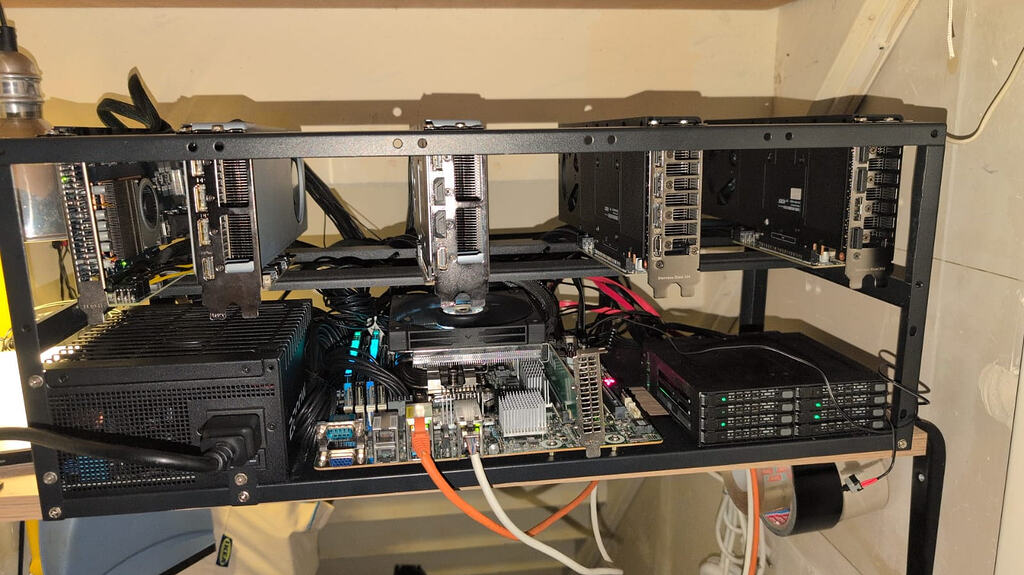
So i recently got my PLX88096 chip in the mail, and have used it to install 4 R9700 AI’s onto the system, however it seems my poor prosumer grade AM4 X570-D4U-2L2T/BCM motherboard has had enough of my shenanigans and just doesnt have the BAR space to deal with it
My onboard 10Gbe also stopped working, but i suspect this is just a side effect of the lack of BAR space
I’ve added the Dmesg logs and my kernel opts
Please obi-wan janitobi’s, you guys are my only hope:
Kernel Args:
GRUB_CMDLINE_LINUX_DEFAULT=“quiet amd_iommu=on iommu=pt pcie_aspm=off amdgpu.ras_enable=0 pci=realloc=on amdgpu.runpm=0 amdgpu.gpu_recovery=1 pcie_acs_override=downstream,multifunction, default_hugepagesz=1G hugepagesz=1G hugepages=108 transparent_hugepage=always”
DMESG: See attachment
[dmesg.txt](https://forum.level1techs.com/uploads/short-url/cuEyL12crKwewszQIO6ydsM2IAr.txt) (46.6 KB)

For your viewing pleasure(or distaste, depending on tolerance):
3 Likes
It WORKS!!!, it was Legacy CSM support being enabled, i have a new problem now though, even though everything is now properly showing inside the VM P2P is still disabled in AMD-SMI topology:
ACCESS TABLE:
0000:01:00.0 0000:02:00.0 0000:03:00.0 0000:04:00.0 0000:01:00.0 ENABLED DISABLED DISABLED DISABLED
0000:02:00.0 DISABLED ENABLED DISABLED DISABLED
0000:03:00.0 DISABLED DISABLED ENABLED DISABLED
0000:04:00.0 DISABLED DISABLED DISABLED ENABLED
WEIGHT TABLE:
this is inside the VM that’s being passed through all these devices
So i managed to get my system working with all 4 GPU’s behind the pcie switch passed through to my VM, however i still can’t get the damn P2P to work nice inside my VM’s, i’m suspecting it has to do with PCIE atomics not working properly for guest vm’s or something of that nature, can anyone more experienced in this than me chip-in?
Alright i’m starting to suspect QEMU p2p within proxmox is a non-starter due to atomics issues, within Proxmox atomics are perfectly enabled on all four cards:
lspci -s 33:00.0 -vvv | grep -i atom

AtomicOpsCap: 32bit+ 64bit+ 128bitCAS-
AtomicOpsCtl: ReqEn+
ECRC- UnsupReq- ACSViol- UncorrIntErr- BlockedTLP- AtomicOpBlocked- TLPBlockedErr-

ECRC- UnsupReq- ACSViol- UncorrIntErr- BlockedTLP- AtomicOpBlocked- TLPBlockedErr-

ECRC- UnsupReq- ACSViol- UncorrIntErr+ BlockedTLP- AtomicOpBlocked- TLPBlockedErr-
Tree also looks good:
lspci -tv:

[lspcitv.txt](https://forum.level1techs.com/uploads/short-url/zrEUDAokYcd9VuOKdpfqbMbSwF6.txt) (5.7 KB)
When i get home from work I will try and make an unprivileged LXC container instead to see if the Atomics magically start to work.
If there is any wizened proxmox PCIe guru out there, i’d appreciate your thoughts XD, i’d prefer to use VM’s still even if LXC does work On the flip-side though i’m already running Qwen 3.8 flash-next at a reasonable 30-ish tokens a sec but none of the GPU’s are using more than 100 watts out of 300, so i’m leaving WAAYYY too much performance on tap
You you have above 4g decoding and rebar enabled?
Oh you have that server style am4 board, that should have adequate bar space then
yeah the GPU’s actually work great now, just no P2P behind my pex88096 still
i though atomics were disabled in the guest vm but they actually DO seem to be enabled on closer inspection on the guest VM:
root@Rocmbuntu-V2:~# lspci -s 04:00.0 -vvv | grep -i atom

AtomicOpsCap: 32bit+ 64bit+ 128bitCAS-
AtomicOpsCtl: ReqEn+
ECRC- UnsupReq- ACSViol- UncorrIntErr- BlockedTLP- AtomicOpBlocked- TLPBlockedErr-

ECRC- UnsupReq- ACSViol- UncorrIntErr- BlockedTLP- AtomicOpBlocked- TLPBlockedErr-

ECRC- UnsupReq- ACSViol- UncorrIntErr+ BlockedTLP- AtomicOpBlocked- TLPBlockedErr-

root@Rocmbuntu-V2:~# lspci -s 03:00.0 -vvv | grep -i atom

AtomicOpsCap: 32bit+ 64bit+ 128bitCAS-
AtomicOpsCtl: ReqEn+
ECRC- UnsupReq- ACSViol- UncorrIntErr- BlockedTLP- AtomicOpBlocked- TLPBlockedErr-

ECRC- UnsupReq- ACSViol- UncorrIntErr- BlockedTLP- AtomicOpBlocked- TLPBlockedErr-

ECRC- UnsupReq- ACSViol- UncorrIntErr+ BlockedTLP- AtomicOpBlocked- TLPBlockedErr-

root@Rocmbuntu-V2:~# lspci -s 02:00.0 -vvv | grep -i atom

AtomicOpsCap: 32bit+ 64bit+ 128bitCAS-
AtomicOpsCtl: ReqEn+
ECRC- UnsupReq- ACSViol- UncorrIntErr- BlockedTLP- AtomicOpBlocked- TLPBlockedErr-

ECRC- UnsupReq- ACSViol- UncorrIntErr- BlockedTLP- AtomicOpBlocked- TLPBlockedErr-

ECRC- UnsupReq- ACSViol- UncorrIntErr+ BlockedTLP- AtomicOpBlocked- TLPBlockedErr-

root@Rocmbuntu-V2:~# lspci -s 01:00.0 -vvv | grep -i atom

AtomicOpsCap: 32bit+ 64bit+ 128bitCAS-
AtomicOpsCtl: ReqEn+
ECRC- UnsupReq- ACSViol- UncorrIntErr- BlockedTLP- AtomicOpBlocked- TLPBlockedErr-

ECRC- UnsupReq- ACSViol- UncorrIntErr- BlockedTLP- AtomicOpBlocked- TLPBlockedErr-

ECRC- UnsupReq- ACSViol- UncorrIntErr+ BlockedTLP- AtomicOpBlocked- TLPBlockedErr-
even the lspci -tv looks clean inside the VM to me:
lspcitvqemuguest.txt (2.3 KB) So if its not atomics or motherboard(going through the pex88096 switch) holding back p2p, what could it be
That’s all linux speak to me I just know about bar space because I use enterprise cards to play games LOL
Have you enabled sr-iov?
Seems like that’s an important vm thing
Kind of hoping Wendel or someone else knowledgeable on P2P enablement can give me some tests to run, i’m running out of ideas and i’m not feeling too hopeful about LXC now that i know atomics probably aint it
A quick Google on amd p2p
Do you have the gpus running through a PCI-E muxer card?
That might interfere with the uhhh “directness” of the direct memory access
Try take a card out and putting it directly into one of the slots and see if it complains on every card but one I’m behind a pcie switch specifically a PLX88096, direct CPU attachment also does not work (have already tried), the switch should not be the problem though if anything it should help due to it allowing bypass of the AM4 consumer chipset platform, if you search through the forum its an often recommended remedy to use a switch like this to enable P2P on prosumer hardware…..just not for my setup unfortunately
RCCL might be broken if you’re not behind a switch, but direct peer-to-peer is also iffy if you’re in a virtual machine. Digital Spaceport has a guide on running VLLM in a container in LXC and Proxmox, and I think you might want to give that a try. Just to see. Obviously the container setup is going to be pretty similar, but the software is probably going to be very different because you’re on RDNA 4 and not using CUDA. That said, if you can get it working in a VM, you probably can get it working on the host. And it’s really just because you need peer-to-peer. I’m running a virtual machine with four 9700 Pros myself. I’m just not using direct peer-to-peer because no switch, it wouldn’t work anyway.
Yeah i wasn’t expecting it to work without the switch, apart from being able to run 4 of them getting P2P potentially working was a major reason for buying the PEX88096 switch from aliexpress
I’m going to try and get it to work with LXC tonight, wish me luck
root@Rocmbuntu-V2:~# amd-smi topology ACCESS TABLE:
0000:01:00.0 0000:01:00.1 0000:01:00.2 0000:01:00.3 0000:01:00.0 ENABLED ENABLED ENABLED ENABLED
0000:01:00.1 ENABLED ENABLED ENABLED ENABLED
0000:01:00.2 ENABLED ENABLED ENABLED ENABLED
0000:01:00.3 ENABLED ENABLED ENABLED ENABLED
WEIGHT TABLE:
THANK YOU DEEPSEEK V4.1 FLASH XD
uh one moment now the rocm bandwidth test won’t run, performing transfers resets the GPU
gpu-reset.txt (3.0 KB) IT WORKS!
For the most part (i’m only getting 28.5GB/s bidi between cards, not the 63~ i’d expect from pcie gen 4), Still though i’m over the effing moon, since atleast i can try out VLLM properly now on my VM setup
#
[Common] (Suppress by setting HIDE_ENV=1) ALWAYS_VALIDATE = 0 : Validating after all iterations
BLOCK_BYTES = 256 : Each CU gets a mulitple of 256 bytes to copy
BYTE_OFFSET = 0 : Using byte offset of 0
CU_MASK = 0 : All
FILL_COMPRESS = 0 : Not specified
FILL_PATTERN = 0 : Element i = ((i * 517) modulo 383 + 31) * (srcBufferIdx + 1) GFX_BLOCK_ORDER = 0 : Thread block ordering: Sequential
GFX_BLOCK_SIZE = 256 : Threadblock size of 256
GFX_SINGLE_TEAM = 1 : Combining CUs to work across entire data array
GFX_TEMPORAL = 0 : Not using non-temporal loads/stores
GFX_UNROLL = 4 : Using GFX unroll factor of 4
GFX_WAVE_ORDER = 0 : Using GFX wave ordering of Unroll,Wavefront,CU
GFX_WORD_SIZE = 4 : Using GFX word size of 4 (DWORDx4) MIN_VAR_SUBEXEC = 1 : Using at least 1 subexecutor(s) for variable subExec tranfers
MAX_VAR_SUBEXEC = 0 : Using up to all available subexecutors for variable subExec transfers
NUM_ITERATIONS = 10 : Running 10 timed iteration(s) NUM_SUBITERATIONS = 1 : Running 1 subiterations
NUM_WARMUPS = 3 : Running 3 warmup iteration(s) per Test SHOW_ITERATIONS = 0 : Hiding per-iteration timing
USE_HIP_EVENTS = 1 : Using HIP events for GFX/DMA Executor timing
USE_HSA_DMA = 0 : Using hipMemcpyAsync for DMA execution
USE_INTERACTIVE = 0 : Running in non-interactive mode
USE_SINGLE_STREAM = 1 : Using single stream per GFX device
VALIDATE_DIRECT = 0 : Validate GPU destination memory via CPU staging buffer
VALIDATE_SOURCE = 0 : Do not perform source validation after prep
P2P Related
NUM_CPU_DEVICES = 1 : Using 1 CPUs
NUM_CPU_SE = 4 : Using 4 CPU threads per Transfer
NUM_GPU_DEVICES = 4 : Using 4 GPUs
NUM_GPU_SE = 32 : Using 32 GPU subexecutors/CUs per Transfer
P2P_MODE = 0 : Running Uni + Bi transfers
USE_FINE_GRAIN = 0 : Using coarse-grained memory
USE_GPU_DMA = 0 : Using GPU-GFX as GPU executor
USE_REMOTE_READ = 0 : Using SRC as executor
Bytes Per Direction 268435456
Unidirectional copy peak bandwidth GB/s [Local read / Remote write] (GPU-Executor: GFX) SRC+EXE\DST CPU 00 GPU 00 GPU 01 GPU 02 GPU 03
CPU 00 → 16.17 11.17 11.18 11.19 11.17
GPU 00 → 14.27 297.29 14.24 14.25 14.26
GPU 01 → 14.27 14.26 299.37 14.25 14.25
GPU 02 → 14.25 14.26 14.26 299.89 14.25
GPU 03 → 14.28 14.26 14.25 14.25 299.76
CPU->CPU CPU->GPU GPU->CPU GPU->GPU Averages (During UniDir): N/A 11.18 14.27 14.25
Bidirectional copy peak bandwidth GB/s [Local read / Remote write] (GPU-Executor: GFX) SRC\DST CPU 00 GPU 00 GPU 01 GPU 02 GPU 03
CPU 00 → N/A 11.08 11.07 11.07 11.09
CPU 00 ← N/A 14.19 14.19 14.19 14.19
CPU 00 ↔ N/A 25.28 25.26 25.26 25.27
GPU 00 → 14.19 N/A 13.89 13.88 13.90
GPU 00 ← 11.08 N/A 13.88 13.88 13.89
GPU 00 ↔ 25.27 N/A 27.77 27.77 27.79
GPU 01 → 14.19 13.88 N/A 13.88 13.89
GPU 01 ← 11.08 13.90 N/A 13.90 13.88
GPU 01 ↔ 25.27 27.78 N/A 27.78 27.77
GPU 02 → 14.17 13.89 13.89 N/A 13.89
GPU 02 ← 11.08 13.87 13.87 N/A 13.87
GPU 02 ↔ 25.25 27.76 27.76 N/A 27.76
GPU 03 → 14.19 13.88 13.89 13.87 N/A
GPU 03 ← 11.10 13.89 13.89 13.89 N/A
GPU 03 ↔ 25.29 27.77 27.79 27.77 N/A
CPU->CPU CPU->GPU GPU->CPU GPU->GPU Averages (During BiDir): N/A 12.63 12.64 13.89
I cant say i did this solo (thanks deepseek :P) But the problem was two-fold: The Rocm DKMS module has a bug in it, that just straight up disables P2P, after deepseek corrected that the ENABLED messages started but i still could not use actual tools like rocm bandwidth test as it would just cause GPU resets.
The Magic bullet turned out to be lowering the position in-memory of the GPU’s(see the attached AI writeup)
After setting this i was finally able to use P2P tests and tooling, My next target is either figuring out why i seem to be stuck at pcie gen3 speeds and running VLLM with RCCL
P2P-SETUP.txt (5.6 KB) 1 Like