AI agents don't just call a model and return its response. Instead, they orchestrate entire workflows that involve selecting tools for LLMs to use, evaluating guardrails, routing between LLM calls, and managing context across conversation turns. This means that a single user request can spawn dozens of internal steps, each one a potential point of failure, latency, or unexpected cost.
AI agent observability is the practice of capturing these execution flows so you can understand what the agent did, why it chose that path, and how it performed. In practice, this means tracing an agent run's execution path, capturing inputs and outputs at each step, and tracking cost, token usage, latency, and error rates.
AI agent tracing builds the foundation for AI agent observability. Without tracing, debugging an AI agent becomes a game of trying to guess which event triggered what decision in the agent workflow, and why.
Why do AI agents need observability? #
A request can return successfully while the agent gives an incorrect answer, takes too long on a particular step, or triggers duplicate LLM or tool calls. Agent observability gives engineers the evidence to investigate these problems and compare behavior across runs.
Let's look at some of these problems in more detail.
LLM non-determinism compounds across agent steps
A single LLM call is already non-deterministic: the same prompt can produce different outputs across runs. Agents amplify this because they chain multiple LLM calls together, where the output of one step determines the input of the next.
This means variance doesn't just exist at one point. Rather, it compounds across the workflow. A slightly different model response in step one can cause the agent to select a completely different tool in step two, which changes the context passed to step three, and so on. Reproducing a specific agent run becomes nearly impossible without capturing the full execution path.
Agents can silently produce incorrect results
Traditional software can also return incorrect results without throwing an error. With agents, these failures can be harder to catch because each run can take a different path: the workflow completes without any error, but the agent selected the wrong tool, retrieved stale context, or returned a response that is confidently incorrect.
Without observability, these silent failures only surface when a user complains or when downstream systems consume bad output. Tracing each decision in the agentic loop, such as which tool was selected, what context was available, what the model actually returned, is the only reliable way to evaluate whether an agent's "successful" run was actually logically correct.
Cost and latency are unpredictable by design
Agents decide at runtime how many tools to call and how many LLM roundtrips to make. A simple user query might resolve in one LLM call, while a similar query might trigger several tool calls and model invocations depending on the agent's reasoning.
This makes cost and latency inherently unpredictable. Observability lets engineers track token usage, tool call frequency, and per-step latency across runs to identify expensive patterns early. For example, if two models with different pricing tiers perform comparably for a given workload, engineers can switch to the cheaper option — but only if they have the data to make that comparison.
How does OpenTelemetry enable AI agent observability? #
OpenTelemetry (OTel) is a CNCF graduated project for instrumenting applications to emit telemetry data (primarily traces, metrics, and logs) in a vendor-neutral format. What makes it uniquely suited for agentic applications is that your visibility extends beyond the AI agent to the entire request: what endpoint did the user call, what DB queries ran, were any background jobs enqueued, did the application make any downstream API calls?
Setting up AI agent observability with OpenTelemetry #
Prerequisites
- Python 3.12 or newer. Download the latest version .
- A SigNoz Cloud account for visualizing telemetry data.
- An OpenAI API key to run the agent.
- An API client like Bruno orPostman to test endpoints.
Setting up SigNoz Cloud
SigNoz Cloud is an OpenTelemetry-native observability platform that unifies traces, metrics, and logs in a single interface.
- Sign up for a free SigNoz Cloud account.
- Follow the documentation to generate an ingestion key.
- Keep your workspace region (e.g.,
us,in,eu) and ingestion key handy for the application configuration.
Running the Demo Application
Clone and navigate to the demo application:
git clone --filter=blob:none --sparse https://github.com/SigNoz/examples.git
git -C examples sparse-checkout set python/otel-ai-agent-observability-demo
cd examples/python/otel-ai-agent-observability-demo
Create and activate a Python virtual environment:
python3.12 -m venv .venv
source .venv/bin/activate
Install the application and OpenTelemetry Python dependencies:
pip install -r requirements.txt
The requirements.txt file pins the following OTel packages:
opentelemetry-distro: Provides a convenient mechanism to configure some of the more common options for Python auto-instrumentation.opentelemetry-exporter-otlp: Installsthe OTLP exporters needed to deliver telemetry data to anyOpenTelemetry-compatible backend .opentelemetry-instrumentation-genai-openaiandopentelemetry-instrumentation-genai-openai-agents: Modern OpenAI Agents and OpenAI Python API instrumentation packages from the dedicatedOpenTelemetry GenAI repository .
Next, run opentelemetry-bootstrap to detect widely used Python libraries (like the FastAPI web framework and HTTPX client library) and install their corresponding instrumentation packages:
opentelemetry-bootstrap --action=install
Start the application using opentelemetry-instrument to automatically instrument our application, including the AI agent workflow:
OPENAI_API_KEY="<your-openai-api-key>" \
OTEL_EXPORTER_OTLP_ENDPOINT="https://ingest.<your-region>.signoz.cloud:443" \
OTEL_EXPORTER_OTLP_HEADERS="signoz-ingestion-key=<your-ingestion-key>" \
OTEL_SERVICE_NAME="otel-ai-agent-observability-demo" \
OTEL_RESOURCE_ATTRIBUTES="service.version=1.0.0,deployment.environment=dev" \
OTEL_EXPORTER_OTLP_PROTOCOL="http/protobuf" \
OTEL_INSTRUMENTATION_GENAI_CAPTURE_MESSAGE_CONTENT=span_only \
opentelemetry-instrument fastapi run --port 8085 --workers 1
Here is what these OpenTelemetry environment variables configure:
OTEL_SERVICE_NAME="otel-ai-agent-observability-demo": Uniquely identifies the application in SigNoz Cloud.OTEL_RESOURCE_ATTRIBUTES: Attaches metadata (version1.0.0, environmentdev) to all exported telemetry. This is used to organize and filter telemetry in the OpenTelemetry backend.OTEL_INSTRUMENTATION_GENAI_CAPTURE_MESSAGE_CONTENT=span_only: Captures model prompts, completions, and tool definitions as span attributes on LLM model spans.
The FastAPI server starts on port 8085. Calling / returns a quick health check response:
(.venv)  ❯ curl "http://127.0.0.1:8085/"
{"message":"OpenTelemetry NBA agent demo is running"}
The demo is now running. Before exploring the agent code, let’s look at the OpenTelemetry conventions and instrumentation packages used to capture AI agent workflows.
Understanding OpenTelemetry’s evolving GenAI conventions
While early instrumentation discussions focused solely on "LLM tracing", OpenTelemetry standardizes AI telemetry under the broader umbrella of Generative AI (GenAI), using semantic conventions prefixed with gen_ai.*.
Because GenAI patterns and agentic harnesses evolve far more rapidly than traditional HTTP or database libraries, OpenTelemetry created a dedicated repository, open-telemetry/opentelemetry-python-genai, to enable maintainers to independently develop and publish these libraries.
This migration introduced a cleaner, split-scope architecture:
opentelemetry.instrumentation.genai.openai_agents: Instruments the agent orchestration harness, emitting spans for workflow execution (invoke_workflow) and agent routing (invoke_agent).opentelemetry.instrumentation.genai.openai: A companion package that instruments the underlying model calls (chat), capturing token usage (gen_ai.usage.input_tokens,gen_ai.usage.output_tokens), model parameters, and prompt context.
The earlier Agents instrumentation combined workflow and model-call tracing in a single package.
Additionally, because opentelemetry-bootstrap has not yet added these dedicated GenAI packages to its automated discovery list, you must install and track them separately through your requirements.txt or pyproject.toml files.
How the NBA agent uses tools, guardrails, and sessions
Now that we've seen how OpenTelemetry separates agent orchestration from model calls, let's look at the code behind the NBA agent's workflow. Skip to the next section if you want to jump directly to generating and inspecting traces.
FastAPI serves our HTTP endpoints, the OpenAI Agents SDK manages the agent loop, and the OpenAI Python API library handles the underlying model calls. This separation is why we instrument both the Agents SDK and the API library: one captures the workflow, while the other captures each model call.
The core agentic setup
Our web application exposes an NBA Reporter agent that answers questions on NBA topics (e.g., general news or finals), performs web research, calculates team win percentages, and retains conversation history across turns via server-managed session persistence.
The agent_service.py file defines the agent configuration and the execution function used by our FastAPI endpoint.
We initialize the agent with a system prompt, tools, input guardrails, and model selection. The application uses gpt-6-luna ( OPENAI_MODEL = "gpt-6-luna" in app/config.py), which delivers consistent multi-turn reasoning and tool formatting:
NBA_AGENT = Agent(
    name="NBA_Reporter",
    instructions=NBA_INTERACTIVE_PROMPT,
    tools=[WebSearchTool(), calculate_win_percentage],
    input_guardrails=[nba_content_guardrail],
    model=OPENAI_MODEL,
)
The calculate_win_percentage function tool gives the agent a deterministic way to calculate and display team win percentages without the risk of arithmetic hallucinations:
@function_tool
def calculate_win_percentage(wins: int, losses: int) -> str:
    """Calculates the winning percentage for an NBA team given their wins and losses."""

    total_games = wins + losses
    if total_games == 0:
        return ".000"

    return f"{wins / total_games:.3f}".lstrip("0")
To prevent misuse or off-topic queries, we define an input guardrail. When a user prompt does not match relevant basketball keywords, the function returns a GuardrailFunctionOutput with tripwire_triggered=True:
app/guardrails.py
python
@input_guardrail()
def nba_content_guardrail(
    context: RunContextWrapper[None],
    agent: Agent,
    input_data: str | list,
) -> GuardrailFunctionOutput:
    """Ensures the user query is relevant to basketball/NBA."""

    keywords = [
        "nba",
        "basketball",
        "player",
        ... # truncated for brevity
    ]

    if isinstance(input_data, list):
        latest_user_message = next(
            (
                item.get("content", "")
                for item in reversed(input_data)
                if isinstance(item, dict) and item.get("role") == "user"
            ),
            "",
        )
        input_query = latest_user_message
    else:
        input_query = input_data

    input_query = input_query.lower()
    is_relevant = any(keyword in input_query for keyword in keywords)

    if len(input_query) < 5 or is_relevant:
        return GuardrailFunctionOutput(tripwire_triggered=False, output_info=None)

    return GuardrailFunctionOutput(
        tripwire_triggered=True,
        output_info={
            "reason": "The request is off-topic. Please ask questions relevant to NBA or basketball."
        },
    )
Setting tripwire_triggered=True instructs the Agents SDK to abort execution and raise an InputGuardrailTripwireTriggered exception. We intercept this in a FastAPI exception handler to record the exception event directly on the active OpenTelemetry span before returning an HTTP 400 response:
@app.exception_handler(InputGuardrailTripwireTriggered)
async def handle_guardrail_block(
    request: Request,
    exc: InputGuardrailTripwireTriggered,
) -> JSONResponse:
    guardrail_msg = exc.guardrail_result.output.output_info
    span = trace.get_current_span()

    span.record_exception(exc)
    return JSONResponse(status_code=400, content={"detail": guardrail_msg})
Managing session context across turns
The run_agent_turn function completes our implementation. The agent uses the OpenAIConversationsSession object to persist and gather conversation context across turns.
If no session_id was passed, the session object triggers the creation of a new conversation session. In a follow-up request, the user can attach this ID to ensure the agent has context of the conversation thus far.
app/agent_service.py
python
def run_agent_turn(
    topic: str,
    user_message: str | None,
    session_id: str | None,
) -> dict:
    nba_topic = _validate_topic(topic)
    prompt = build_nba_turn_prompt(nba_topic, user_message)

    session = OpenAIConversationsSession(conversation_id=session_id)
    result = Runner.run_sync(NBA_AGENT, prompt, session=session)

    message = sanitize_agent_message((result.final_output or "").strip())
    ... # truncated for brevity

    return {
        "topic": topic,
        "session_id": session.session_id,
        "message": message,
        "model": OPENAI_MODEL,
        "usage": usage,
    }
Visualizing AI agent workflows with OpenTelemetry #
Let’s send the agent a few requests to generate traces, then inspect how tool calls, conversation history, and guardrail failures appear in SigNoz Cloud.
Interacting with the agent
Let’s start by asking the NBA Reporter agent a question about the Lakers' win percentage in the 2025-26 season, as well as LeBron and his future with the team. This query asks three distinct questions, setting us up for follow-up questions in the next turn, and the win percentage ask should trigger the calculate_win_percentage tool.
The agent responds first with the win percentage calculation — the format matches our tool's response shape. It makes a prediction about the upcoming NBA season, and informs us that LeBron is no longer with the LA Lakers.
The response JSON also contains the model name, token usage details at a glance, and the session_id to continue the conversation in follow-up requests.
Let's now add the session_id to our request payload and ask why LeBron switched teams. We'll refer to LeBron as he to test the agent's context retrieval capabilities.
The agent correctly identifies he as LeBron in the context of the conversation, and outlines why he moved to a new team. It also returns the same session_id in the response, further confirming continuation of the previous conversation.
Finally, let’s ask an off-topic question to see whether the input guardrails trigger to prevent users from abusing our agent:
Because the prompt lacks basketball-related keywords, the tripwire fires immediately. This helps the agent abort execution before executing tools or calling the model, preventing unneeded API spend and latency.
Exploring the trace hierarchy in SigNoz Cloud
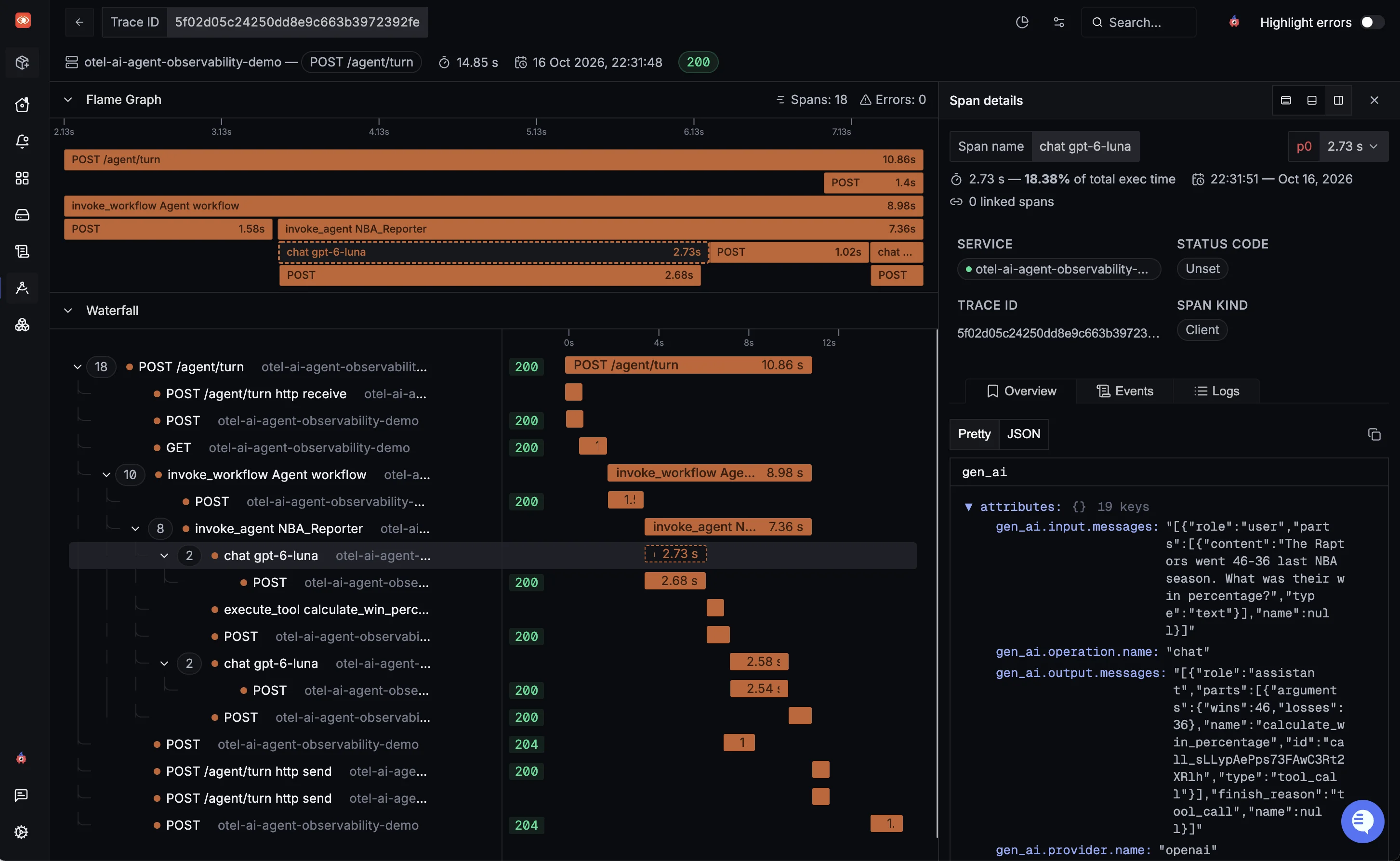
Now let's visualize in SigNoz Cloud the multi-step trace that invoked tool use:
Modern OpenTelemetry GenAI instrumentation structures the request into a clean, hierarchical span tree:
POST /agent/turn                                     [fastapi]              Server   26.00s
├─ POST /agent/turn http receive                     [asgi]                 Internal
├─ POST /v1/conversations                            [httpx]                Client
├─ GET  /v1/conversations/{id}/items?order=asc       [httpx]                Client
├─ invoke_workflow Agent workflow                    [genai.openai_agents]  Internal 24.41s
│  ├─ POST /v1/conversations/{id}/items              [httpx]                Client
│  └─ invoke_agent NBA_Reporter                      [genai.openai_agents]  Internal 23.71s
│     ├─ chat gpt-6-luna                             [genai.openai]         Client    3.94s
│     │  └─ POST /v1/responses                       [httpx]                Client    3.84s
│     ├─ execute_tool calculate_win_percentage       [genai.openai_agents]  Internal
│     ├─ execute_tool calculate_win_percentage       [genai.openai_agents]  Internal
│     ├─ POST /v1/conversations/{id}/items           [httpx]                Client
│     ├─ chat gpt-6-luna                             [genai.openai]         Client   18.21s
│     │  └─ POST /v1/responses                       [httpx]                Client   17.90s
│     └─ POST /v1/conversations/{id}/items           [httpx]                Client
├─ POST /v1/traces/ingest  ×3                         [httpx]                Client
└─ POST /agent/turn http send  ×2                    [asgi]                 Internal
This trace highlights several key structural details of the agentic loop:
- Full-stack request lifecycle : The trace begins at the FastAPI boundary (
POST /agent/turn). Before the agent workflow executes, child HTTP spans show the session layer fetching conversation history (GET /v1/conversations/{id}/items). - Dedicated agentic scopes : The agent orchestration harness is captured under
opentelemetry.instrumentation.genai.openai_agentsvia theinvoke_workflowandinvoke_agentspans, defining the agent's decision boundary. - Iterative tool execution loop : Rather than a single model completion, the trace maps the full multi-step loop:
- Initial model call (
chat gpt-6-luna, 3.94s) : The model processes the turn, detects the win percentage query, and emits tool call instructions. - Tool execution (
execute_tool calculate_win_percentage×2) : The agent loop executes our tools, followed by an HTTP span persisting the tool results to the conversation session. - Final synthesis call (
chat gpt-6-luna, 18.21s) : The model receives the tool outputs and generates the comprehensive user-facing response.
- Standardized GenAI attributes : Selecting either
chat gpt-6-lunaspan reveals attributes for:
- Provider and model :
gen_ai.provider.name,gen_ai.request.model, andgen_ai.response.model. - Operation and outcome :
gen_ai.operation.nameandgen_ai.response.finish_reasons. - Token usage :
gen_ai.usage.input_tokensandgen_ai.usage.output_tokens.
Inspecting message content and privacy controls
Because we set OTEL_INSTRUMENTATION_GENAI_CAPTURE_MESSAGE_CONTENT=span_only, the instrumentation populates gen_ai.input.messages, gen_ai.output.messages, gen_ai.system_instructions, and gen_ai.tool.definitions directly as span attributes. This allows engineers to inspect the exact prompts, system instructions, and model completions for each turn during debugging.
In environments with sensitive data or strict PII compliance, prompt content capture can be turned off entirely by setting:
export OTEL_INSTRUMENTATION_GENAI_CAPTURE_MESSAGE_CONTENT=no_content
This retains model timing, token counts, and span hierarchies while omitting raw message payloads and input/output values from the exported telemetry.
Handling guardrail failures in traces
When an off-topic query triggers the input guardrail tripwire, the agent stops execution before calling the model.
In our FastAPI exception handler, intercepting InputGuardrailTripwireTriggered and invoking span.record_exception(exc) captures the exception event on the root span.
Monitoring agent performance and metrics
While individual traces let you debug specific agent executions, understanding production behavior requires aggregated metrics across turns, models, and sessions.
The OpenTelemetry GenAI instrumentation automatically emits standard metrics—such as gen_ai.client.operation.duration and token usage counters—alongside your traces. SigNoz Cloud captures this telemetry in a dedicated AI Observability interface that aggregates operational health, latency percentiles, and agent loop behaviors in one unified view.
Executive KPIs and contextual drilldowns
The top-level overview surfaces high-level operational indicators across your agent infrastructure:
- Total cost and token volume : Tracks spend and token consumption across services to help identify expensive workloads.
- Latency percentiles and TTFT : Tracks tail latency and Time to First Token (TTFT) for streaming responses.
- LLM call volume and error rates : Monitors traffic spikes and model failure rates across services.
Use the dashboard's trace and log drilldowns to track the corresponding telemetry responsible for the numbers. Break down individual metrics by attributes such as model name or service, then combine those breakdowns with dashboard-level filters to answer questions like:
- Which model cost you the most for a particular service in the given time frame?
- How does LLM latency compare between staging and production over time?
- Could differences between your team's test requests and customer requests explain the gap?
Evaluating model latency and response times
Multi-turn reasoning and tool selection introduce variable latency across agent interactions. The LLM latency by model table and time-series charts track execution performance across percentiles:
- Percentile breakdowns : Compare p50, p90, and p95 latencies by model to see whether slow responses affect typical requests or only the tail.
- Interactive time-series : Drill into traces around a latency spike to inspect how much time was spent in model calls and tool execution.
Diagnosing agent loops with finish reasons
The Finish reasons panel shows how model invocations end:
["stop"]: Indicates the model finished generating a final response to the user.["tool_calls"]: Indicates the model requested one or more tool executions, prompting the agent loop to execute the tool and start another turn.
Spikes in ["tool_calls"] relative to ["stop"] can be signals of recursive agent behavior, repetitive tool retries, or agents struggling to synthesize an answer.
Tool call performance and span distribution
The Tool calls section aggregates telemetry from the tools invoked by the agent:
- Tool call rate and error tracking : Shows how often each tool runs and fails, helping identify repeated calls or unreliable tools.
- Tool duration : Shows which tools contribute the most latency to an agent run.
- Top span names : Compares agent, model, and tool span counts. Unexpected differences, such as a large gap between agent spans and LLM spans, can guide further trace inspection.
Conclusion #
As AI applications evolve from simple model prompts into autonomous, multi-turn agents, traditional debugging approaches fall short. Agent workflows are non-deterministic, span multiple tool calls, and rely on dynamic context that can silently degrade in quality.
Instrumenting your agents with OpenTelemetry delivers end-to-end visibility across every layer:
- Full request context : Correlate incoming HTTP requests, session storage lookups, agent decision loops, and downstream API calls in a single trace.
- Vendor-neutral GenAI standards : Leverage official OpenTelemetry semantic conventions (
gen_ai.*) to standardize metrics, attributes, and span structures without proprietary lock-in. - Unified debugging in SigNoz Cloud : Combine traces, metrics, and logs in one interface to diagnose hallucinated tool calls, identify latency bottlenecks, and govern token spend across production runs.
If you’re building agentic applications, sign up for a free SigNoz Cloud trial to start observing your AI agents with OpenTelemetry today.