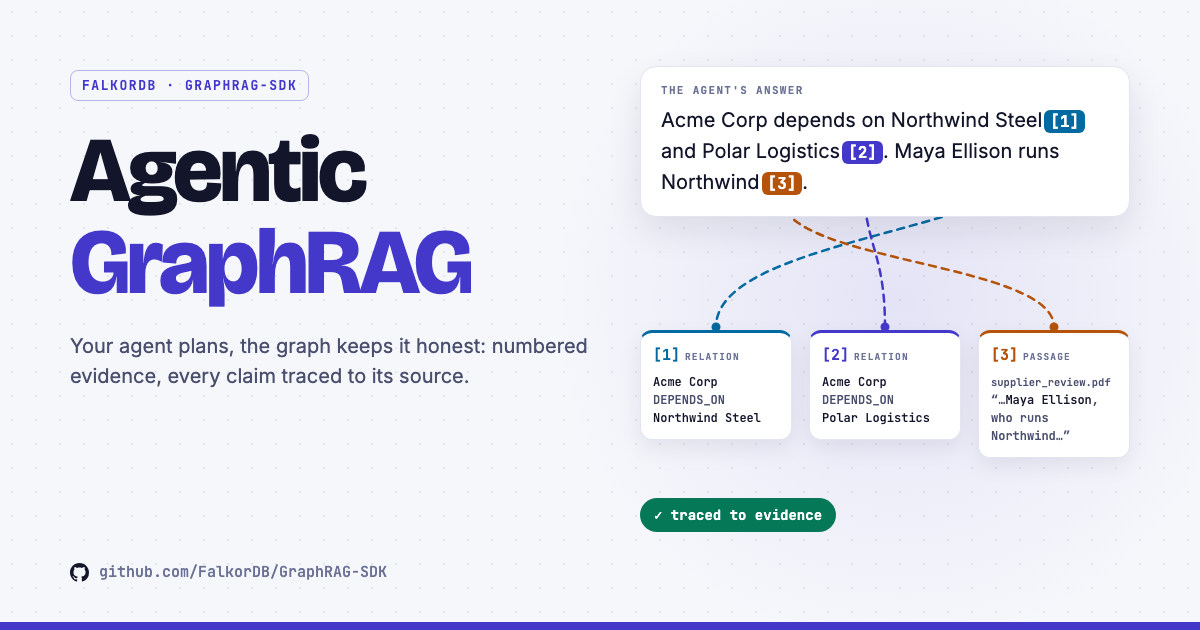
Agentic GraphRAG on FalkorDB: GraphRAG-SDK gives the agent you already run, whether that's Claude Code, Cursor, a LangGraph or pydantic-ai agent, or your own, a set of bounded tools over a FalkorDB knowledge graph. Every piece of evidence comes back numbered, every citation can be checked, and the same agent can build the graph from a folder with a plan tailored to each file. Here's how it works and how to use it.
The whole architecture in 40 seconds. An agent asks, the toolkit searches FalkorDB without writing to it, evidence comes back numbered, the citations are checked, and the same agent builds the graph from a folder.
We didn't build another agent. We built the ground it stands on. #
Agents are everywhere, and they're good at planning. What they lack is a source of knowledge they can query safely and cite honestly.
So GraphRAG-SDK does not run an agent loop. Your agent plans, calls the graph tools and writes the answer. The SDK makes every one of those calls safe: it runs each one bounded, runs its own graph queries as GRAPH.RO_QUERY while retrieve's searches only read, numbers every piece of evidence it returns, and gives the agent check_citations to verify the [n] citations in its draft against that evidence before it replies.
Reach for the tools when a question needs more than one lookup: "which suppliers are connected to this plant", multi-hop chains, comparisons. For a plain question about the content, rag.completion() answers it in a single step.
Eight tools, one contract #
Three tools read the graph, one checks the answer, and four handle ingestion. An operator decides which ones an agent sees: read_only=True hides the ingestion tools entirely, and include= narrows the set further.
status Entity, relation, document and chunk counts, with every label and relation type
get_ontology Declared entity and relation types with their (source, target) patterns, plus live counts
retrieve Hybrid search for a question: entities, relations, facts and source passages
check_citations Verifies every
[n] in a draft answer against the evidence it was given
preview_files One sample from the middle of each file, to design an ontology from
set_ontology Adds entity and relation types and patterns, and updates descriptions. Never removes
ingest Adds text, or files under a root folder with a plan per file
finalize Deduplicates, embeds and indexes after a batch of ingests
Every tool honours the same contract. Input is validated against a strict schema. Each call returns a typed result, and to_llm_text() renders it compactly for a model, sharing space fairly across sections and giving the source passages twice the room, so a long list of entities can't crowd them out. A call with bad arguments, or to a tool that isn't available, raises ToolError with a hint that names the fix, so the agent knows what to do next. Calling an ingestion tool on a read-only toolkit raises ReadOnlyViolation.
from graphrag_sdk.tools import GraphRAGToolkit

toolkit = GraphRAGToolkit(rag, read_only=True)

for spec in toolkit.tool_specs():          # name, description, JSON Schema
    register_with_your_agent(spec.name, spec.description, spec.input_schema)

result = await toolkit.call("retrieve", {"question": "Where does Alice work?"})
print(result.to_llm_text())                # compact text with [n] evidence numbers
Any framework that accepts a name, a description and a JSON Schema can register these tools as-is. Multi-tenant setups get GraphRAGToolkit.for_tenant(base_config, "acme", ...), which binds a toolkit to that tenant's own graph.
retrieve: five search paths in one call #
One call to retrieve runs a hybrid search, combining vector, full-text and graph search, across five paths. By default it runs all five. An agent that knows what a question needs can name just the paths that fit:
Which paths fit which question:
| Question | exact_names | fuzzy_names | facts | links | passages |
|---|---|---|---|---|---|
| “What do we know about Acme Corp's supply chain?”retrieve(question) # all five run | ● | ● | ● | ● | ● |
| “Who works with Maya Ellison?”retrieve(question, paths=["exact_names", "links"]) | ● | ○ | ○ | ● | ○ |
| “Which company owns the firm that supplies Acme's steel?”retrieve(question), then expand_hops=3 to walk three hops out | ● | ● | ● | ● | ● |
| “Why did Acme switch steel suppliers?”retrieve(question, paths=["exact_names", "passages", "facts"]) | ● | ○ | ● | ○ | ● |
The agent picks the paths. These follow the guide the MCP server hands every client: name the paths a question needs, leave them out for broad questions, and go deeper with exact names, links or more hops when the first call misses.
The walk is precise at every step. links follows edges in both directions and each edge once, and every requested hop gets its own share of the results, so the first hop can't crowd out the deeper ones. Lookups only ever return entities that are actually stored, and no embedding vector or internal node label ever reaches the model's prompt.
Evidence with numbers, answers with receipts #
Every entity, edge, fact and passage a tool returns carries an evidence number. So does each status and get_ontology result, so even an answer about the graph itself can be cited. The numbers run across every call in a session, one per conversation, so an answer can cite results from several calls. Before replying, the agent runs check_citations on its draft, as the MCP server's guide tells every client to. Here is one draft, checked:
session = toolkit.new_session()               # one numbering per conversation
found = await session.retrieve("Where does Alice work?")
check = await session.check_citations(draft)
check.grounded      # cites at least one real piece of evidence
check.invalid       # numbers that point at nothing; removed from check.answer
check.uncited       # sentences stating a figure or a name with no [n]
check.unsupported   # cited sentences whose figures or names the evidence lacks
A marker can cite one item ([3]), a list ([1, 4]) or a range ([1-3]). Because the check is deterministic, the same draft against the same evidence always gets the same verdict.
Read-only by construction #
A read tool can't write, and that isn't left to a prompt to enforce. The toolkit's own graph queries (counts, ontology, entity cards, relation expansion, the existence check) run as GRAPH.RO_QUERY, so FalkorDB itself refuses any write. retrieve's search paths run the SDK's standard retrieval queries, which only read.
Missing means missing
A graph that was never written or has been deleted is never silently created. retrieve and get_ontology raise an error naming it, and status says so in its hint.
Down means down
If FalkorDB is unreachable, the call says Could not reach the graph store instead of reporting an empty graph the agent might believe.
Nothing internal leaks
Results never carry embedding vectors or internal __Label__ names. The model only sees what it can reason about.
Errors say what to do
Graph 'kb' does not exist. Hint: Ingest documents (and finalize) first… An agent can recover from that without a human.
MCP: plug the graph into any agent #
The same tools ship as an MCP server, graphrag-mcp. Any MCP client can then search, cite and build a FalkorDB knowledge graph with nothing more than a config entry.
pip install "graphrag-sdk[mcp,markdown,pdf]"
graphrag-mcp --read-only                                  # stdio, for local MCP clients
graphrag-mcp --files-root ./corpus                        # can also build the graph from ./corpus
GRAPHRAG_MCP_TOKEN=... graphrag-mcp --transport sse --host 0.0.0.0   # network, token required
{
  "mcpServers": {
    "graphrag": {
      "command": "graphrag-mcp",
      "args": ["--read-only"],
      "env": { "FALKOR_HOST": "localhost", "GRAPHRAG_GRAPH": "my_graph", "OPENAI_API_KEY": "sk-..." }
    }
  }
}
- Secure on the network. Serving SSE on a non-loopback host without a bearer token is refused. A loopback server accepts only requests whose
Host(andOrigin, when sent) names it, which blocks DNS rebinding. - Writes need a yes.
ingest,set_ontologyandfinalizecarry MCP's destructive annotation, so clients that honour MCP annotations ask the user before running them. - Your models, your choice.
GRAPHRAG_MODELandGRAPHRAG_EMBED_MODELpick the LLM and the embedder, andGRAPHRAG_EMBED_DIMits dimension; use the same embedding model and dimension the graph was built with. - A guide comes with the tools. The server tells every client how to use them well: call
retrievefirst with the user's question word for word, go deeper with exact names orexpand_hopswhen needed, cite[n], and always runcheck_citationsbefore replying.
From a folder to a graph, driven by the agent #
Give the toolkit a files_root and an agent can build the graph itself from a folder of .txt, .md, .markdown, .rst and .pdf files. Clients that honour MCP annotations ask you before each write.
1
Settle the ontology
Ask the user for one. Otherwise page through preview_files, which gives one sample from the middle of every file, then declare one ontology for the whole corpus with set_ontology.
2
Ingest with a plan
ingest(files=[...], plan=[rules]), globs welcome. The first rule that matches a file picks its chunker, extractor and resolver.
3
Finalize once
After the last batch, finalize deduplicates, embeds and indexes.
4
Close the gaps
Each result's pruned says what the ontology misses, and for relations whose type pair wasn't declared, its hint gives the exact set_ontology call that keeps them. Extend the ontology, then re-extract just those files.
toolkit = GraphRAGToolkit(rag, files_root="corpus/")
await toolkit.set_ontology(
    entities=[{"label": "Drug"}, {"label": "Disease"}],
    relations=[{"label": "TREATS", "patterns": [["Drug", "Disease"]]}],
)
result = await toolkit.ingest(
    files=["notes/*.md", "reports/*.pdf"],
    plan=[{"match": "*.md", "chunker": "structural"}, {"match": "*", "chunker": "sentence"}],
)
print(result.pruned)       # what the ontology misses
await toolkit.finalize()
Re-running is safe. An unchanged file is skipped, and a changed file is replaced in place rather than added beside its old chunks. Within a toolkit or MCP server, an update or re-extraction runs on its own, so its cleanup never touches something a parallel ingest has just written. The file root is guarded too: .., absolute paths, hidden files and symlinks leading out of it are refused.
A plan per document, tuned by you #
Chunking, extraction and entity resolution decide graph quality, and the right choice depends on the document. Pass auto=True and a planner inspects a sample of each document and picks all three for it.
| Document | chunker | extractor | resolver | Why |
|---|---|---|---|---|
| handbook.md | structural planner |
gliner planner |
exact planner |
Markdown with headings keeps its structure, so each chunk follows a section. |
| meeting_notes.txt | sentence planner |
gliner planner |
exact planner |
Plain prose with no headings or lists gets sentence chunking, the default. |
| handbook.md, you pass a resolver | structural planner |
gliner planner |
ExactMatchResolution() caller |
Explicit wins: a strategy you pass is never overridden. The planner only fills the rest. |
Example plans, and every decision is recorded.
result.metadata["plan"] stores the plan, its reason, and where each slot came from: caller, planner or default.
from graphrag_sdk import HeuristicIngestionPlanner

await rag.ingest(source="handbook.md", auto=True)                 # one small LLM call decides
await rag.ingest(source="handbook.md", planner=HeuristicIngestionPlanner())   # zero cost
await rag.ingest(source="handbook.md", auto=True,
                 plan_limits={"chunkers": ("sentence", "structural", "contextual"),
                              "extractors": ("gliner", "llm")})      # allow costlier options
| Planner | Cost | How it decides |
|---|---|---|
| LLMIngestionPlanner | One small LLM call per document | A guided prompt over a sample of the document. The default with auto=True |
| HeuristicIngestionPlanner | Zero | Cheap features: file extension, headings, lists |
| RuleBasedIngestionPlanner | Zero | Your rules: the first glob that matches the file. This is what the agent's ingest tool uses |
You decide what a plan may use
With auto=True, and in the toolkit, the planner picks only strategies that add no LLM calls beyond the one extraction call per chunk: sentence, fixed or structural chunking, gliner entity extraction and exact resolution. Turn on richer ones, like contextual chunking, the llm extractor or llm_verified resolution, through plan_limits: on rag.ingest() for your own pipeline, or on GraphRAGToolkit(..., files_root=...) for an agent, whose tool description then tells it what each option costs in LLM calls, so it spends them only where a file benefits.
- Clamped parameters. The planner may tune values like chunk size, but every value is coerced and clamped to a safe range, so a model can never produce an unsafe config.
- Never silently broken. An empty or invalid plan, or a planner error, falls back to safe defaults (
sentence/gliner/exact, or the first option you allowed). A slot that can't be built falls back on its own, while the others still follow the plan. - Document text is data. The sample the planner reads is quoted and marked as data. Even content written to steer it can only land on an option you already allowed.
The path router: only the paths a question needs #
rag.completion() can be selective too. MultiPathRetrieval runs every retrieval path for every question by default. Give it a router and each question runs only the paths it needs.
from graphrag_sdk import (ConnectionConfig, FalkorDBConnection, GraphRAG, GraphStore,
                          HeuristicPathRouter, MultiPathRetrieval, VectorStore)

conn = FalkorDBConnection(ConnectionConfig(host="localhost", graph_name="kb"))
strategy = MultiPathRetrieval(
    graph_store=GraphStore(conn),
    vector_store=VectorStore(conn, embedder=embedder, embedding_dimension=256),
    embedder=embedder, llm=llm,
    router=HeuristicPathRouter(),          # or LLMPathRouter(llm)
)
rag = GraphRAG(conn, llm=llm, embedder=embedder, retrieval_strategy=strategy)
HeuristicPathRouter
No model call. Always runs relates and chunks. It adds expansion and entity_cypher for relationship questions ("how are X and Y connected"), and the entity paths when a question quotes a phrase or names something.
LLMPathRouter
One short LLM call returns the path ids to run. Any object with an async plan(query, ctx) works as a router.
A failed route runs everything. An empty plan, or a router that fails, runs every path, so a router failure never costs recall.
Agentic GraphRAG, built to be trusted #
Giving a model access to your knowledge only works if every edge case lands somewhere safe. Here is where each one lands:
| If… | Then |
|---|---|
| an agent wants to write through a read tool | There's no way to: the toolkit's own queries run as GRAPH.RO_QUERY , andretrieve 's searches only read |
| the agent cites [n] it never got | It's listed as invalid and removed from the answer |
| the graph doesn't exist | The tools say so by name, and nothing is created |
| two MCP clients share a server | Each gets its own evidence numbering |
| a document tries to steer the plan | It can only reach options you allowed, with clamped values |
| the planner or router fails | The defaults run, or every path does |
you don't pass auto= , a planner or a router |
Ingestion uses the default chunker, extractor and resolver, and rag.completion() runs every retrieval path |
Frequently asked questions #
Which agents can use these tools? #
Any MCP client, such as Claude Code or Cursor, through graphrag-mcp and a single config entry. In Python, tool_specs() gives each tool's name, description and JSON Schema, which is exactly what frameworks like LangGraph and pydantic-ai register.
Can an agent change or delete my data? #
Not through the read tools: the toolkit's own queries run as GRAPH.RO_QUERY, so FalkorDB itself refuses writes, and retrieve's searches only read. Start the server with --read-only (or pass read_only=True) and the write tools aren't offered at all. When you do serve them, they carry MCP's destructive annotation, so clients that honour MCP annotations ask you first.
How do I know an answer is really grounded in the graph? #
Every piece of evidence carries a number, and check_citations verifies each [n] in the draft: that a tool really returned it in this session, and that the figures and names it backs appear in that evidence. The check is literal and makes no LLM call, so the same draft against the same evidence always gets the same verdict.
When should I use rag.completion() instead of the tools? #
rag.completion() answers a plain question about your content in one call, and with a path router it runs only the retrieval paths each question needs. The tools shine when a question takes several steps: multi-hop chains, comparisons, “which X are connected to Y”.
Can the agent build the knowledge graph too? #
Yes. Give the toolkit a files_root and the agent previews the files, declares an ontology, ingests with a plan per file and finalizes. Each result tells it what the ontology still misses, so it can extend the ontology and re-extract. In your own code, rag.ingest(auto=True) brings the same per-document planning to any pipeline.
Give your agent a graph. #
Install the SDK, start a FalkorDB, and point any MCP client at graphrag-mcp. Your agent searches, cites and builds, and every answer comes with receipts.
github.com/FalkorDB/GraphRAG-SDK
docker run -p 6379:6379 -p 3000:3000 \
  falkordb/falkordb

pip install "graphrag-sdk[mcp,markdown,pdf]"
Author #
Software Engineer at FalkorDB, working across AI, GraphRAG, and developer platforms. He builds graph-powered AI solutions, contributes to GraphRAG, Snowflake integrations, and MCP tooling, and develops full-stack products while driving automation, testing, and open-source initiatives with Python and TypeScript.