Staying ahead of security threats and configuring your IT security can be complex. Verifying the security state of your devices shouldn't be.
As Windows evolves to be more secure and AI-ready, we want to make it easier for end users and IT admins to understand their PCs' security state, and to know what actions to take when requirements aren't met.
In February, we described where Windows is heading: a platform that is even more secure by default while remaining an open ecosystem for developers and partners. What we shared was about principles: system-enforced transparency, user-centric consent, and a security baseline that keeps Windows devices better protected with an easily verified state.
Today we have something concrete to share. We have completed the first phase of work to make Windows security protections more streamlined and verifiable out of the box. This new functionality will help end users, IT admins, and application developers better understand and address a Windows devices' security status. Windows baseline protection is now available in preview through the Windows Insider Program, with general availability planned for 2027.
Baseline protection brings foundational safeguards together into a clear, verifiable security state. On personal or unmanaged devices, baseline protection makes it easy for users to view and update certain security capabilities through the Windows Settings app. For IT admins, device baseline protection is managed through the Microsoft 365 admin center baseline security mode. Windows baseline protection also makes it easier for developers to check against a device's security posture, to ensure that their apps are running on devices that meet the app's security requirements.
Together with our broader Windows security announcements at Microsoft Ignite 2026, Windows baseline protection is a meaningful step toward greater transparency and control for everyone who depends on Windows security every day.
Simplifying security safeguards with Windows baseline protection #
Windows already includes a range of built-in security technologies, such as hardware root of trust, secure boot, virtualization-based security (VBS), memory integrity, and stricter driver requirements. These protections are available on Windows 11 devices, but historically have sometimes been hard for users or IT admins to view, track, or enforce. They are independent settings, often configured differently on every device, making it challenging to easily tell whether a given PC has them on or not.
Windows baseline protection replaces that patchwork with one thing: a versioned, attestable device security state. A device reports true only if it meets every baseline protection requirement; otherwise, it reports false. That single true/false answer is computed by the platform, rooted in hardware, and available to the person using the PC, to their IT administrator, and to the apps and services they rely on.
It turns Windows security from a collection of individual settings into a device trust signal.
What are the baseline protection criteria?
The first version of Windows baseline protection requires:
| Security processor | Helps protect sensitive data by using dedicated hardware. | | Secure boot | Helps prevent malicious software from when your device starts. | | Virtualization-based security | Helps protect critical processes from attacks by using hardware virtualization to create an isolated environment. | | Memory integrity | Helps prevent malicious code from running in protected parts of Windows. | | Signed drivers only | Helps prevent untrusted drivers from by allowing only signed drivers | | Windows-certified drivers | Only allows drivers that meet Windows hardware signing requirements. | | Kernel debugger protection | Helps prevent tools from bypassing Windows security protections. | | Vulnerable driver protection | Helps prevent known vulnerable drivers from weakening Windows security protections. |
Every item on this list is available in Windows today. What's new is that Windows now evaluates them together, as one attested result. Windows baseline protection is designed to evolve with new versions as the security bar increases**.** This is the floor, not the ceiling. As the threat landscape changes, the criteria will grow. And, because it's versioned, everyone who depends on it knows exactly which bar a device has cleared. We'll explain how future criteria are added and versioned in a forthcoming blog.
How it works #
Windows checks the baseline protection state at boot, using measurements from the security processor. Every requirement is enforced from boot onward, and turning any of them off requires a reboot. A device has an active baseline protection state only when all requirements are enforced, so users and apps can check the state once, without repeated queries.
That result is available three ways:
A simple state query. Is baseline protection active on this device? Yes or no. #
A detailed report. If the answer is no, which criteria are missing – so the answer is actionable rather than just discouraging. #
A hardware-backed attestation token. For scenarios that need cryptographic proof rather than a local answer, the state can be attested and validated from a secure relying party.
What this means for you #
If you use Windows
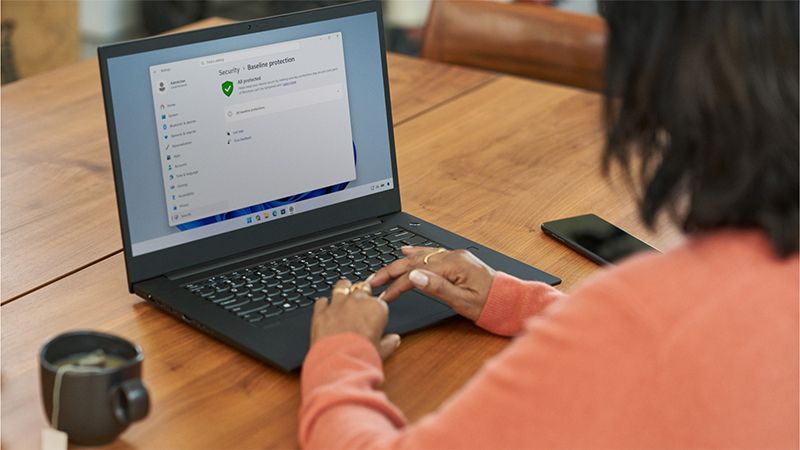
As a user, you'll find baseline protection in Settings under Security, and it answers one question plainly: Is my PC meeting the security bar and, if not, what do I do about it?
When your device meets the baseline protection requirements, the Baseline protection Settings page tells you so. When it doesn't meet the requirements, you see exactly which protections are missing. Moreover, for personal or unmanaged devices, Windows gives you a single easy button to update the missing protections and restarts your device.
If a firmware change is required—for example, enabling Secure Boot or the TPM in your device's UEFI—Windows guides you through it. Once the missing protections are enabled, Settings will show that your device meets all requirements.
Apps can also point you straight to this Settings page, so if an app sees your device doesn't meet the bar, you're one click from fixing it.
For managed devices, users may not be able to update or install the fixes themselves; rather, the IT administrators can use these signals to identify and remediate devices that don't meet the requirement.
If you manage Windows
IT administrators will have better visibility and enforcement capabilities to make sure the devices they manage meet the Windows baseline protection requirements, using the Microsoft 365 admin center's Baseline Security Mode, Microsoft Intune, or third-party management tools. These new capabilities give you better insights into the security posture of your fleet instead of a spreadsheet of individual settings.
Report. See tenant-wide compliance in Intune. Drill into any device and see exactly which criteria it's failing. #
Enforce. Use a compliance policy to make baseline protection requirements a condition of access, and push the underlying controls to devices that need them. #
Track. Watch for devices that don't meet baseline protection requirements and catch it when a configuration change quietly weakens a machine.
If you build for Windows
Historically, app developers wanting to check on the system integrity of a Windows device needed to run their own security checks: a bank's app tests for a TPM, a game's anti-cheat looks at driver signing, an exam proctoring service verifies secure boot. What they are looking for varies, as do the responses they receive.
We are making this simpler for developers by consolidating the most foundational security checks into the one baseline protection check. There are two things we're asking of developers, and the first one makes your life easier immediately.
First, use the signal instead of building your own. If your app checks for a TPM, tests secure boot, verifies VBS, or maintains its own device-posture logic, you can replace all of it with one question: "Are the baseline protection requirements met on this device?" For higher-trust scenarios, take the attestation token provided by the platform and verify it server-side. This reduces the need to maintain feature-by-feature checks and provides a consistent signal for assessing baseline protection.
What your app does with the answer is entirely your decision. Allow, warn, gate a specific feature, reduce functionality, log it, or block. The platform reports the state; you own the policy.
We're already working with software vendors across education, gaming, and productivity who are building on this.
| "A consistent security signal gives apps and organizations a shared foundation to build on. Windows baseline protection, alongside Adobe's own work to detect and stop counterfeit and malicious software, helps us identify risk faster and build trust with our customers. We're glad to be an early partner in testing this approach and strengthening security industry-wide." — Michael Draper, Vice President, Global Consumer Trust, Adobe |
| "The Battle.net team values the consistency of the clear security framework in Windows baseline protection. It is facilitating our ability to increase our security posture against the backdrop of a complex game distribution ecosystem, all while minimizing player friction. We are excited to maintain a secure yet player-friendly platform with a clear roadmap and excellent support." — John Yaney, VP, Engineering, Battle.net, Blizzard Entertainment |
| "As Raycast brings AI agents to Windows, people need to trust what apps can do on their PC. Windows baseline protection gives developers and IT one consistent foundation, so every app doesn't have to reinvent security on its own. What we're most excited about is where this is leading in the future: better control of security privileges in apps and enabling users and organizations to understand the security of their devices." — Thomas Paul Mann, CEO & Co-founder, Raycast |
| "Protecting sensitive information starts with knowing whether the device handling it has essential security protections enabled. Windows baseline protection gives apps a consistent way to check those protections and helps people understand what needs fixing. That aligns with our vision at 1Password of a safer, simpler digital future for everyone: making it easier for people to understand and improve their security, so they can focus on what they need to do." — Mike Blacker, CISO, 1Password |
| "Schools need to trust the device a student brings to an exam. With Windows baseline protection, the OS defines and enforces a security standard, and the API lets Schoolyear verify compliance before the exam starts. This allows us to rely on the platform for device integrity and keep our own software focused on the exam." — Gergely Homonnai, Lead Security Engineer, Schoolyear |
Second, make sure your app works on a device that meets the requirements. Test your app on a PC with Windows baseline protection, including all security features and policies turned on. If your app depends on any security features being off, it's depending on a weakened platform state.
Your call to action: Use Windows baseline protection and make sure your app is compatible with it. Test your app on a device that meets the baseline protection requirements today.
A new security experience within Windows Settings #
Windows baseline protection is part of a larger reimagining of the Windows security experience. With the latest release, you will notice some changes to how you view security settings on their device.
This new experience includes a new dedicated Security page in Windows Settings, bringing together security settings and quick links to other settings. These changes help bring a more end-to-end experience around the settings that protect you and your device.
We're also introducing firewall controls directly in the settings view, alongside your network and internet settings.
These changes are part of our ongoing work to make security easier to find, understand, and manage in the places you already use.
What's next #
This is a preview. Baseline protection requirements create a security standard that will increase over time. As security needs advance and the threshold evolves, the same single signal keeps working, and everyone who depends on it knows their device continues to meet the bar.
We'll keep the updates coming as the work progresses, and we'll keep adjusting based on what we learn. General availability is planned for 2027, and what you tell us between now and then shapes it. Send us feedback via Feedback Hub or the "Give feedback" link on the baseline protection page of the Settings app.
Together, we can strengthen the Windows ecosystem and build the next 40 years of innovation – grounded in trust, transparency and user consent.
Learn more #
To learn more about Windows baseline protection and Windows security at Microsoft Ignite, check out these resources.
If you are joining us at Microsoft Ignite (in person or virtually), tune in live or on demand to Secure by default: Simplify device security at scale . #
Read our other Windows security announcements at Microsoft Ignite in the Windows Experience Blog . #
See how we are thinking about security across Windows in the new Windows Security Guide . #
Windows baseline protection is part of our investments in securing the Windows foundation. To learn more, check out Windows endpoint security platform reaching general availability .
[BrandonBray](https://techcommunity.microsoft.com/users/brandonbray/2321453)

[Windows IT Pro Blog](https://techcommunity.microsoft.com/category/windows/blog/windows-itpro-blog)