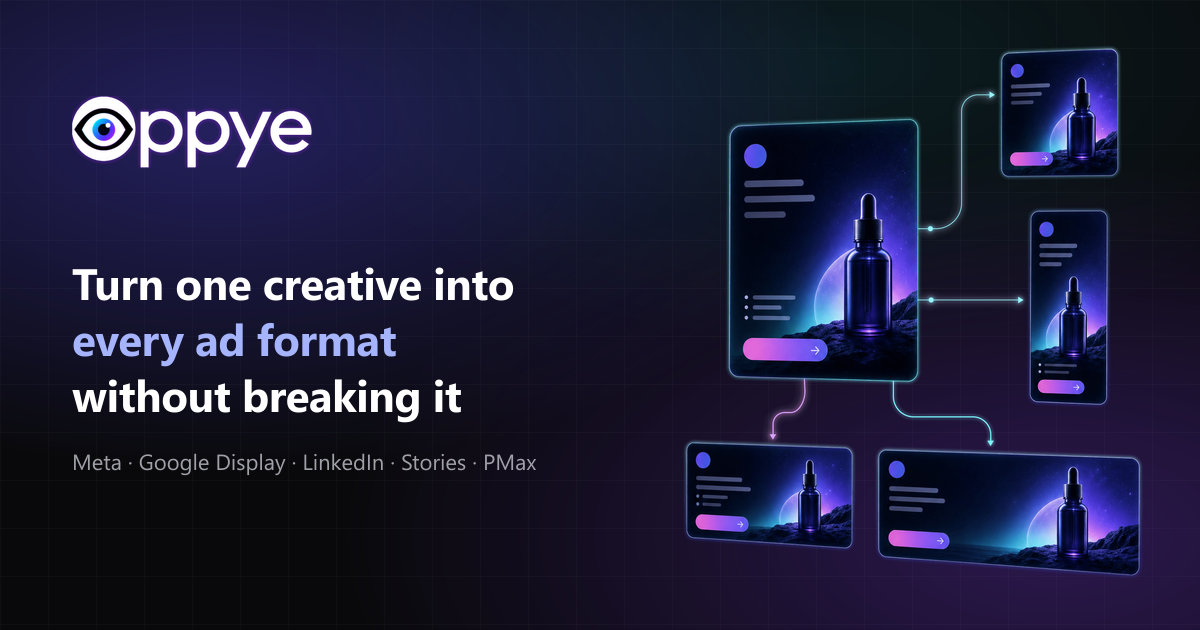
Upload the creative you already approved. Oppye rebuilds it for Meta, Google Display, LinkedIn, and Stories.
Free to sign up. Plans from $29/month — cancel anytime.
Every size, platform-ready
Latest guides & resources #
Practical guides on turning one creative into every size your campaigns need.
Ad Creative
Do AI-Generated Ads Need a Label in the EU? What Marketers & Designers Need to Know in 2026
Do AI-generated ads need a label in the EU? Learn what Article 50 requires, when ads count as deepfakes, platform rules, examples, and practical steps.
August 24, 2026 · By David Bejan
Google Ads
Google Performance Max Banner Sizes: Image Specs, Safe Zones & Creative Checklist (2026)
Get the current Google Performance Max banner sizes, image dimensions, logo specs, safe-zone rules, asset counts, and a practical 2026 checklist.
July 20, 2026 · By David Bejan
Design Tools
10 AI Design Tools Every Graphic Designer Needs in 2026
The 10 AI design tools worth knowing in 2026 — ChatGPT, Photoshop, Illustrator, Firefly, Figma, Ideogram, Magnific (formerly Freepik), Envato, Canva, and Oppye. What each one is actually good at, where it falls short, and how they fit together.
July 9, 2026 · By David Bejan
See the real product at work #
Two real screen recordings: one creative re-composed across ad sizes, and a Performance Max set in the making.
Now showing: Multi-size resize Real screen recordings of the product. Every output is reviewed before export.
Start from a brief or from the creative you already approved #
Oppye supports both net-new concept generation and the production work that happens after a hero visual is approved.
Generate from a prompt
Describe the campaign, audience, offer, platform, and style. Oppye plans the layout, creates the visual direction, reserves space for your logo and CTA, and generates ready-to-review ad concepts.
Resize existing artwork
Already have an approved key visual from Photoshop, Figma, Illustrator, Canva, or another design tool? Upload it and Oppye re-composes the layout for each platform size instead of simply cropping or stretching it.
Built for production workflows, not generic AI art #
Oppye re-composes the creative, not just the canvas — reading the original design, preserving the layout's hierarchy, and rebuilding it for every format.
Renders extreme sizes natively
728×90 leaderboards and 160×600 skyscrapers are composed for that exact canvas — not cropped out of a square.
Brand elements stay intact
Your real logo, product shot, and price are kept as supplied from your file — carried into every size, not reinvented by AI.
Works with any flat banner
No layered PSD, no source file, no editable template — Oppye works from the exported image you already have.
From first idea to campaign-ready sizes #
The workflow follows how real campaign production works: plan, create, refine, and export the sizes each channel needs.
- 1
Start with a prompt or upload
Describe a new campaign or upload an existing key visual.
- 2
AI plans the layout
The system identifies the platform, aspect ratio, hierarchy, logo zone, CTA, and focal elements.
- 3
Generate or re-compose
Create new concepts from scratch or adapt existing artwork to new formats.
- 4
Review on a whiteboard
Every size lands on one canvas. Compare them side by side, and fix anything that needs it with Edit with AI — one written instruction, applied to that banner in place.
- 5
Export campaign sizes
Download platform-ready assets for Meta, Google, LinkedIn, Stories, and display ads — each size is routed automatically to the model that renders its shape best.
One creative, every ad format. Simple plans. #
Generate, resize, edit — one credit balance covers all of it. Cancel anytime; your work stays in your account.
Starter
$29
/month100 creative credits/month
- Monthly credits that renew
- Multi-size campaign exports
- For solo operators and freelancers
Choose Starter Pro
$79
/month300 creative credits/month
- High-quality output (4× detail)
- For active marketers and teams
Choose Pro Agency
$249
/month1000 creative credits/month
- High-quality output (4× detail)
- Email support
- For agencies and multi-client teams

[Choose Agency](https://www.oppye.com/pricing)
At standard quality, 1 credit = 1 generated banner, 1 edit, or 1 resized size. High-quality generation and editing (Pro & Agency) cost 4× — resized sizes are always 1 credit. Compare plans in full for yearly pricing and full plan details.
Straight answers before you start #
The details people ask about most — credits, formats, logos, and how it works in practice.
How does Oppye resize without cropping or stretching? #
How do credits work? #
Which ad formats can I export? #
What happens to my logo? #
Can I edit a resized banner? #
What file types can I upload? #
Which design tools does Oppye work with? #
Built for brand assets #
Your uploaded logos, campaign visuals, and references stay in your account workspace and are used only for your own projects. Oppye is designed for production workflows where brand accuracy, layout consistency, and review before publishing matter.
Account-scoped uploads
Brand assets and references are tied to the account that uploaded them and are never shared across accounts.
Cookie-gated analytics
No analytics cookies are set until you opt in through the cookie banner — and you can change your choice anytime.
Review before publishing
AI-generated outputs are meant to be reviewed and refined before they go into a live campaign.
Turn one approved creative into a full campaign set #
Upload an approved creative or start from a prompt, then export platform-ready sizes in minutes.
Free to sign up · Plans from $29/month · Cancel anytime