William Lyon
November 17, 2026
25 min read
For years I've been using an Amazon wishlist to keep track of my book readling list. Amazon wishlists aren't a great fit for this purpose since they're optimized for keeping track of things to buy, so unfortunately my wishlist is where book recommendations go to be forgotten. It's now 2,002 items long, and it's a flat list without much search functionality or ability to surface what I should read next.
The questions I actually want to ask about my reading are graph questions. Which books share a location? Which authors keep showing up? Given what I've read and liked, what should I read next?
So I built relate-book: one graph of my reading list, stored in Relate, an embedded graph database.
In this post I want to talk about two import aspects of Relate that made this project possible:
- Relate extensions, and
- The Relate Swift client
together is that the graph is one file. A Relate extension builds the file on a laptop with one command, then because a relate graph is a single file an iPhone app opens the same file with the same engine, adds my ratings and notes to it, and uses the graph to expand search results and explain recommendations.
What you'll learn: what Relate is and where it fits, how a Relate extension works and how I built one, how to embed Relate in an iOS app with its Swift client, and how the app combines vector search with graph patterns. Who this is for: developers who know some Cypher and are curious about embedded graph databases. The iPhone half assumes you can read Swift.
What Is Relate?# #
Relate is an open source (Apache-2.0), embedded, single-process graph database that speaks Cypher. The engine runs inside your process, so there's no server to deploy and no account to create. It's optimized for AI agents for use cases like agent memory and agentic coding workflows.
If you've used SQLite then you already have the right mental model: a database that's a library plus a file, not a service. The store is a single .rl file, a directory, or :memory:. There are several ways to use Relate: the CLI, eight language clients, and relate serve which serves HTTP and MCP APIs.
This post uses four of its features: Cypher, the single-file store, vector and full-text indexes behind a SEARCH clause, and extensions.
So where does Relate fit? It fits when the graph belongs to one application, lives on one machine, and fits in that machine's memory. The whole graph lives in RAM, with no paging to disk, and a store has one writing process at a time. A phone app is exactly that shape. It's not the right choice when you have many writers, data bigger than memory, or a need for clustering. The Relate docs are upfront about this in Where relate fits.
The same file also opens from Python (pip install relate-db), from an agent over the Model Context Protocol, or MCP ( relate serve --mcp stdio), and from Neo4j drivers over Bolt ( relate serve --bolt 7687). I won't cover those here, but check out the Relate docs for more specifics.
Extensions Teach Relate New Commands# #
Every graph project starts with an import script. Relate extensions make that script a first-class, installable command in the Relate CLI: relate run <name> -d ./store.rl.
An extension package is a directory with two files: extension.json (the manifest) and one executable. Any language works, and relate extension init will scaffold one for you in Python, shell, TypeScript or Rust.
One interesting aspect of the extension design is in how the extension talks to the database. The extension is an MCP client, and relate run is the MCP server. The extension never sees the store path. It gets its flags as one line of JSON, then asks the host to run Cypher through five tools. The host owns the store, the transactions, the limits and the exit code. Relate reuses a protocol that agents already speak instead of inventing some plugin interface.
These are the five tools the host offers an extension:
| Tool | Arguments | What the host does |
|---|---|---|
update_schema |
one DDL statement | creates indexes and constraints only |
write_cypher |
statement plus $rows |
one write, up to 1000 rows per call |
read_cypher |
statement, parameters | refuses anything the planner calls a write |
batch_cypher |
a list of statements | one transaction per call |
report_output |
summary text, starter queries | prints the run summary |
That's a boundary around the database, not a sandbox. An extension can only reach the store through those five tools, but its executable is an ordinary process that runs with your permissions. It can read your files and use the network, and this one does make network requests. So treat an extension like any other script: run it only if you've read its source or trust where it came from. Relate helps with the second part. An extension installs from one of four sources, each with its own level of trust (a signed first-party channel, a commit-pinned GitHub release, an explicit URL, or a local folder), and relate run never downloads an extension package.
If you want to write your own, the Relate docs have a 15-minute walkthrough that builds a word-count extension: Write an extension. In the next section we'll look at a bigger one to import Amazon wishlists.
Building wishlist-to-graph# #
wishlist-to-graph is the extension I wrote for this project. It fetches a public Amazon wishlist, writes every item to the graph, resolves each book against Open Library, optionally adds facts from Wikidata, and optionally geocodes the places the books are set in. It's one Python file that uses only the standard library, so there's nothing to pip install.
The Python snippets in this section are trimmed from wishlist-to-graph.py to keep them readable.
The Graph Model#
#
Every wishlist row becomes an :Item. Rows that look like books (a binding in the byline, or an ASIN, Amazon's product id, that is a valid ISBN-10) also get the :Edition label and an EDITION_OF relationship to a :Book. Non-books stay plain items, so the graph is a faithful mirror of the list and book queries stay clean.
Open Library is the "spine" of the model: Book and Author nodes are keyed by their Open Library keys. Subjects, places, people, eras and genres become nodes of their own, and that's what turns a list into a graph. Two books that share a place are now two hops apart. Wikidata adds awards, series, citizenship and birthplaces.
Schema First, Then Idempotent Writes#
#
The first thing the extension does is create its schema through update_schema. Every statement is IF NOT EXISTS, so it's safe to run on every import. There are 13 uniqueness constraints, 5 range indexes, 2 full-text indexes and 1 point index.
Then come the writes. Rows travel as the $rows parameter and are never spliced into the Cypher text. Everything is a MERGE on a stable key, which makes the import idempotent - running it again refreshes prices and priorities in place instead of creating duplicates.
WRITE_BOOK_ITEMS = """UNWIND $rows AS r
MERGE (i:Item {asin: r.asin})
SET i:Edition
SET i.title = r.title, i.byline = r.byline, i.format = r.format,
    i.price = r.price, i.currency = r.currency
WITH i, r
MATCH (w:Wishlist {id: $wishlist})
MERGE (w)-[c:CONTAINS]->(i)
SET c.position = r.position, c.priority = r.priority
RETURN count(i) AS items"""

for chunk in chunks(rows, row_chunk):
    client.call("write_cypher", {
        "statement": WRITE_BOOK_ITEMS,
        "parameters": {"rows": chunk, "wishlist": meta["id"]},
    })
Each enriched book goes through batch_cypher, which is one transaction per call, so a book and its authors, subjects and places land together or not at all. The run ends with a report_output call that prints a summary line and a few starter queries.
Enrichment and Geocoding#
#
Resolving a wishlist row to an Open Library work is a chain of up to four lookups: by ISBN when the ASIN is one, by Amazon id (which is what makes Kindle editions work), through the ISBN endpoint, and finally by title and author, checked against the surname in the byline.
Geocoding is where my "simple importer" turned into real work. Open Library places are library catalog headings: "Los Angeles (Calif.)", "Washington (State)", "États-Unis", "Mars". Getting from those to points on a map took a few rules:
- Normalize the heading and expand the catalog abbreviations.
- Keep a synonym table, so United States, USA and États-Unis share one map label.
- Keep a denylist, so fictional and non-terrestrial places are skipped. Nominatim will happily return Mars, Pennsylvania.
- Use the graph to disambiguate. An unqualified heading is checked against the other places of the same books. "Lisbon Falls" on a book that's also set in Maine is Lisbon Falls, Maine, not the waterfall in South Africa.
That last check is a Cypher read through read_cypher. For each place that hasn't been located yet, it collects the other places its books are set in:
MATCH (p:Place)<-[:SET_IN]-(:Book)-[:SET_IN]->(q:Place)
WHERE q <> p AND p.location IS NULL AND p.geo_status IS NULL
RETURN p.name AS name, collect(q.name) AS siblings
Check, Install, Run#
#
relate extension check is the fast inner loop while you're writing an extension. It opens no store and Relate fetches nothing, but it does start the extension's executable to run the MCP handshake. So the rule from earlier applies before the very first command: read the source, or trust it.
relate extension check ./wishlist-to-graph
manifest: ok (wishlist-to-graph 0.2.0, protocol 2025-06-18)
executable: ok (wishlist-to-graph.py)
spawn: ok
initialize: ok (MCP 2025-06-18, server relate 1.1.0)
notifications/initialized: ok
tools/list: ok (the shared tool table: 5 tools)
pin: not from a GitHub source (unmarked)
Installing from the local folder and importing a list are two more commands. This is the opt-in path for bringing your own data, and it's how the bundled store was built from the repository's public six-book sample list:
relate extension install wishlist-to-graph --from ./wishlist-to-graph
relate run wishlist-to-graph <your-wishlist-url> \
    --wikidata --geocode -d ./books.rl
On the six-book sample the import takes about 30 seconds and produces 6 books, 8 authors, 173 subjects, 58 awards and 34 places, 19 of them on the map.
A live import calls other people's servers. Open Library asks API clients to identify themselves and not to make hundreds of single-book requests. For bulk work it publishes monthly data dumps (API guidelines). The public Nominatim server allows at most one request per second, requires results to be cached and attributed, and discourages bulk and recurring jobs (usage policy). And for Amazon, use the extension on lists that are yours.
The extension identifies itself to Open Library, Wikidata and Nominatim with a User-Agent that names the project, keeps to one request per second by default, and caches every geocoding answer on disk, so a re-run geocodes nothing twice. On a small list that adds up to a few dozen requests. It isn't enough on its own for a big one. Enrichment makes two to four Open Library requests per book, which put my own 2,002-item list in the thousands. I ran that import once: 52 minutes for the import (1,811 books, 1,757 of them resolved in Open Library) and 9 more to geocode 600 of the 693 places. For larger or repeated imports, the right sources are the Open Library dumps and a geocoder you host or pay for.
Relate on an iPhone# #
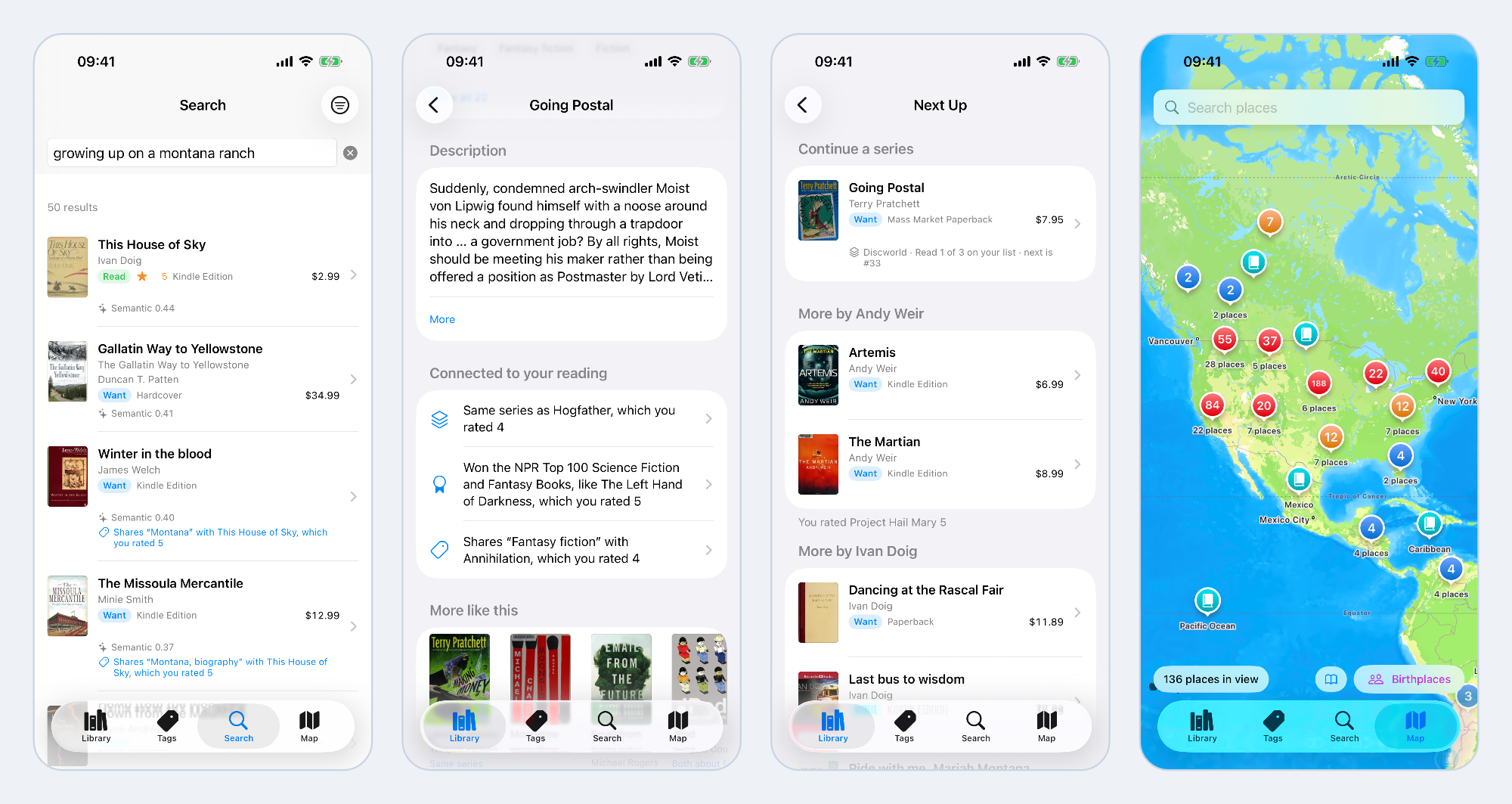
So far everything has run on my laptop. Now let's take that same books.rl file, bundle it into a SwiftUI iOS app, and link the same Relate engine into it. Relate Books lets me browse the list, mark books as read, rate and tag them, keep notes, and search by meaning.
Everything the app knows lives in one file on the phone: the imported graph, my ratings, tags and notes, and the search embeddings. There's no account, and the app has no sync backend of its own. That isn't the same as "never leaves the device" though. The file sits in Application Support, which iOS includes in device backups.
Why Not SQLite?#
#
It's a fair question. SQLite is the default answer on a phone, and it has full-text search built in and vector extensions.
My answer is the operation at the center of this app. Take a ranked list of books, follow seven kinds of typed relationship out to the nodes they share, weigh each shared node by how rare it is, walk back to the other books, and return the strongest link as a reason. And do it over the same data model that holds my ratings and notes. In Cypher the heart of that is one pattern, the one from the sample query above, and changing which relationships count is a one-line edit. In SQL the same thing is a set of self-joins over link tables. It would work. The graph pattern is easier to write, read and change.
The choice has costs, and they're easy to state. Relate keeps the whole graph in memory. That's fine for my 1,811 books (about 17,000 nodes and 30,000 relationships), and it's a real limit for a much bigger graph on a phone. A Release build of the app on Relate 1.1.0 has a 30 MB executable (23 MB stripped), and most of that is the engine. The embedding model adds another 45 MB, and a full index grew my 7 MB store to about 46 MB.
Add the Swift Package#
#
Relate ships a SwiftPM package that supports iOS 16 and macOS 13 or later, with Swift 6. The app itself targets iOS 18. The Swift API shown below shipped in Relate 1.1.0, so that's the release to depend on:
dependencies: [
    .package(url: "https://github.com/relatedb/relate",
             exact: "1.1.0"),
],
I pin the exact version on purpose. The app's tests record engine behavior, so an upgrade should be a change I review, not something a package update does for me.
A release tag resolves a prebuilt, checksum-pinned static XCFramework, so the engine isn't compiled from source. SwiftPM downloads it once (a 377 MB zip, because it carries device, simulator and macOS slices) and caches it. After that swift test runs the app's 293 core tests on the Mac with no other setup.
With the package in place, here's about all the API surface a small app needs. Open the store, run a read, and get a typed value back:
import Relate

let db = try Database(url: storeURL)

let key = "/works/OL59800W"
let title = try await db.read { tx in
    try tx.run("MATCH (b:Book {key: \(key)}) RETURN b.title")
        .scalar(as: String.self)
}
// "The Left Hand of Darkness"
Take a close look at \(key), because it isn't string interpolation. The literal is a Statement, and the value is bound as a parameter. The text the engine sees is:
MATCH (b:Book {key: $_p0}) RETURN b.title
Open, Provision, Migrate#
#
The bundled books.rl is never opened in place. App bundles are read-only, and a .rl file writes its write-ahead log (WAL) into itself. So on first launch the app copies the store to Application Support and opens the copy.
Database.provision does the careful part. It copies only when nothing is at the target, and it copies through a temporary name, so an interrupted first launch never leaves half a store behind. It also applies file protection that still lets the app write while the phone is locked (after its first unlock). Here's the app's launch path, lightly condensed:
static func bootstrap(bundledStore: URL, storeURL: URL? = nil)
    async throws -> GraphStore
{
    let target = try storeURL
        ?? Database.defaultStoreURL(named: "library.rl")
    try Database.provision(at: target, from: bundledStore)
    let store = GraphStore(database: try Database(url: target))
    try await store.migrate()
    try await store.checkpoint()
    return store
}
migrate() runs a Migrator, which is the same idempotent idea as the extension's schema step. It holds what this build of the app expects: IF NOT EXISTS DDL that runs on every launch, plus versioned steps that run once and commit together with the record of their version. The app's DDL adds what the phone needs on top of the imported graph: tag and note constraints, a reading-status index, and two vector indexes (384 dimensions, cosine). A store written by a newer build is refused before anything runs.
Reads and Writes#
#
In Relate's Swift client a Database is Sendable and owns its connections: one writer and up to two readers, each on its own serial queue. The app has no lock or connection handling of its own. It wraps the database in a thin Sendable struct called GraphStore, and I kept one rule for the whole project: views contain no Cypher, and query files contain no SwiftUI.
A few properties of this design turned out to matter a lot in the app.
Reads don't wait for writes. The embedding indexer writes vectors in the background while the library list reads. On a test store the first page of the list took 4.5 ms median while indexing was running, against 4.1 ms when idle.
A read is one snapshot. Statements that must agree with each other share one database.read body, so they see the same data even if a write commits in between.
A write is one transaction. Adding a book is a check plus the writes that depend on it, so two overlapping imports can't both create the same book:
return try await database.write { tx in
    if !(try tx.run(exists).isEmpty) { return .existing(key: key) }
    let results = try tx.run(save)
    // ...
    return .created(key: key, newPlaces: newPlaces)
}
The body is a synchronous closure, so a transaction can never be held across an await. And a read that tries to write is refused, which makes "this screen only reads" something we can verify.
Statements Take Swift Values#
#
A query in the app is a Statement value: Cypher text plus parameters, built by a pure function, Sendable and comparable. That means every query can be unit tested without a store.
The parameter dictionary takes Swift values. Strings, integers and optionals bind as they are, and a Foundation.Date binds as a DATETIME. Here's the statement behind the "mark as read" button:
static func setStatus(key: String, status: ReadingStatus,
                      now: Date, calendar: Calendar) throws -> Statement {
    try Statement("""
        MATCH (b:Book {key: $key})
        SET b.reading_status = $status,
            b.status_changed_on = $now,
            b.started_on = CASE WHEN $status = 'reading'
                THEN coalesce(b.started_on, $today)
                ELSE b.started_on END,
            b.finished_on = CASE WHEN $status = 'read'
                THEN $today ELSE b.finished_on END
        RETURN b.key AS key
        """, [
            "key": key,
            "status": status.rawValue,
            "now": now,
            "today": try CypherValue.Date(now, in: calendar.timeZone),
        ])
}
And here's what actually gets bound, printed from the statement:
key     '/works/OL59800W'
status  'read'
now     2027-01-15T08:00:00+00:00    (DATETIME, UTC)
today   2027-01-15                   (DATE, the user's calendar day)
Why does $today come from Swift? The engine clock is UTC, so an argument-less date() would give tomorrow's date on a US evening. CypherValue.Date takes the time zone explicitly.
Vectors and points are explicit. A bare [Float] binds as a list. An embedding is bound with CypherValue(vector:), and a coordinate with CypherValue.Point.
Results come back as a QueryResult, a collection of Record values with typed access: record.get("title") throws on a type mismatch and names the column.
Housekeeping is two calls. One trace handler on the database sees every statement on every connection, with its row count, engine time and wall time (parameter names, never values). And because every committed write is already durable in the WAL, the app checkpoints when it goes to the background, never per write.
Vector Plus Graph Search# #
With the client in place, let's look at what the app does with the graph. My reading status, ratings, tags and notes are stored in the same graph as the books: status and rating are properties on Book, and tags and notes are nodes. There's no second database sitting beside the graph. So "books connected to something I rated 5" is a pattern, not a join across two stores.
Embeddings are computed on the phone. The model is all-MiniLM-L6-v2 converted to Core ML (45 MB, 384 dimensions). The text embedded for a book is assembled from its graph neighborhood: the title, the authors, up to 15 subjects, and the start of the description. So the graph shapes the vector before any graph query runs.
The search box takes a description like "lonely astronaut saves earth", or a title, or an author. Behind it the app builds four ranked lists and fuses them by rank. Three of the lists come from indexes. The fourth comes from the graph around the best hits.
The first list is semantic. The query is embedded on the device, and the vector goes against the book index. This is Relate's SEARCH clause, which restricts a MATCH to the top results from an index and gives the score a name:
MATCH (b:Book)
SEARCH b IN (VECTOR INDEX book_embedding FOR $q LIMIT $limit)
  SCORE AS score
RETURN b.key AS key, score
ORDER BY score DESC, key
The other two index lists work the same way. One is a vector search over my Note nodes, mapped to books by one hop, so a note that says "loved the winter crossing of the ice" makes its book findable by that idea. The other is a full-text search over books and the wishlist items that point at them. Then comes the fourth list: after the first three are fused, the top hits pull in the books they're connected to. We'll get to that query in a moment.
The lists are combined with reciprocal rank fusion (RRF): a book's score is the sum of 1 / (60 + rank) over the lists it appears in.
The Two-Hop Pattern#
#
The app's graph features come from one idea: two books are connected when they point at the same node with the same relationship. Same series, same author, same award, same person, place, subject or era.
(book)-[rel]->(shared)<-[rel]-(other)
It's the shape of the query used from three starting points: the neighbors of the top search hits, the reason a book connects to what I've read, and the caption under a "More like this" card.
Let's start with the naive version. Here's what The Martian shares with the other books on my list, biggest shared node first:
MATCH (s:Book {title: 'The Martian'})-[r]->(t)<-[r2]-(o:Book)
WHERE type(r) = type(r2) AND o <> s
RETURN type(r) AS via, t.name AS shared, count(DISTINCT o) AS others
ORDER BY others DESC, shared
LIMIT 8
via    shared                                        others
ABOUT  Fiction                                       302
ABOUT  New York Times bestseller                     266
ABOUT  Fiction, science fiction, general             70
ABOUT  Large type books                              53
ABOUT  Romans, nouvelles                             32
ABOUT  Science fiction                               31
ABOUT  Fiction, science fiction, action & adventure  16
ABOUT  Amerikanisches Englisch                       15
By this query The Martian is "related" to 529 of the other 1,810 books, through 862 links, and the biggest reasons are ones no reader would accept. A book isn't like a Mars survival novel because both come in large type.
The links worth having are at the other end of the same list, on nodes that only two or three books share: the author Andy Weir, the place "Mars (Planet)", the subject "Astronauts". So the app weighs every link, using these rules:
- Strength by kind. Series 4, author 3, award 2, person 1.5, place and subject 1, era 0.5. Genres are left out.
- Rarity. A link weighs its strength divided by its degree, the number of books on the shared node. A subject on two books says more than a subject on two hundred.
- Two caps. A node on more than 50 books links nothing and is never expanded ("Fiction" is on 303). Neither does a subject, place, person or era on more than a third of the library, unless it's on exactly two books.
- Noise never links. That covers machine tags and catalog headings such as "New York Times bestseller".
Starting from The Left Hand of Darkness, these are the first five rows on my list:
title                       weight  via         name
Always Coming Home          1.50    WRITTEN_BY  Ursula K. Le Guin
2312                        0.73    ABOUT       Extraterrestrial anthropology
Stranger in a Strange Land  0.58    ABOUT       Life on other planets
Going Postal                0.56    WON         NPR Top 100 ...
Brave New World             0.53    ABOUT       Ciencia-ficción
The Rest of the App# #
Two more features are worth a short mention, because each one shows a limit of the graph the importers build.
Next Up answers "what should I read next?" with three multi-hop reads that start at my reading and end at unread books: the next book in a series I've started, more by authors I rated 4 or 5, and unread award winners, with the ones that share an award with a favorite first. All three run inside one database.read, so they see one snapshot and their counts agree with the book rows. The lists are built independently though, so the same book can show up in more than one. The series list is also shorter than I expected: the graph has only 10 series and 12 PART_OF relationships across 1,811 books. Series come from Wikidata, and the coverage is thin. The feature is only as good as the import.
Adding books works on the phone, by Open Library search, ISBN barcode or typed title. The importer is the extension's logic ported to Swift, with the same labels and MERGE keys, but it writes a smaller graph: the book and its authors, subjects, places, people, eras and genres. There's no wishlist Item, no Publisher node, and nothing from Wikidata, so no series and no awards. A book found in Open Library is embedded, shows up in search, links to other books through authors, subjects and places, and reaches the map once its places are geocoded. A typed-in title has only its authors. Neither can appear in the series or award lists of Next Up. Those relationships depend on the laptop import.
Interesting findings# #
A graph database can be a file. The unit of deployment for this whole project was books.rl. It was built by one command, opened read-only from a shell, and copied into an app bundle.
MCP works well as a plugin protocol. The extension never opens the store, and the same five tools would work from any language. Just remember what the boundary covers: the database, not your machine.
Vectors find, graphs explain. Similarity search finds the candidates. A two-hop pattern says why, can lift the ones a reader would agree with, and stays silent when there's no nameable reason. It needs weights though. The naive two-hop query is worse than no recommendations at all, and even the weighted one can lift the wrong book.
What's Next?# #
The same graph also runs in a browser tab. The repository's web/ app runs Relate as WebAssembly, with a graph explorer, hybrid search, a Cypher console and in-browser models for text to Cypher. That's a post of its own, and so are the other ways to query a Relate store and the app's map. The newsletter below is the best way to catch them.
If you'd like to try any of this yourself, clone relate-book, query the sample store, and open the Xcode project.
Resources# #
- relate-book on GitHub - the extension, the iOS app and the web app
- Relate , theRelate docs andrelatedb/relate on GitHub
- Where relate fits
- Write an extension andInstall and run an extension
- Relate in an iOS app andUse the Swift package
- Search by vector similarity andFull-text and hybrid search
- Connect an agent over MCP
- Open Library API , theNominatim usage policy andall-MiniLM-L6-v2
relate-book is a personal project and isn't affiliated with Amazon, Open Library, Wikidata or OpenStreetMap. Geocoded places in the sample store use Nominatim data, © OpenStreetMap contributors (ODbL). Only import wishlists that are yours.
Stay Updated
Get notified about new posts and videos